Showing posts with label Alexa. Show all posts

Monday, May 6, 2019

Roman Ruins Adventure, Part 2: Alexa Skill

In this series of posts I'm sharing my experiences creating an old-style text Adventure game, adapted somewhat for the 21st century. In Part 1 I reviewed the history of Adventure games and the game design for my version, Roman Ruins Adventure. Here in Part 2 I'm covering an Alexa Skill implementation of Roman Ruins Adventure.


I've already covered the basic game design, game data representation, and game code in JavaScript. Now we'll look at what it takes to implement the game as an Alexa Skill, a voice-driven app. Since classic Adventure games are textual in nature, it's a perfect fit for a voice assistant.

Alexa Skills Project

Alexa Skills are defined in the Amazon Developer Console.

Alexa Skill Project

Our project has these intents defined:
  • north, east, west, south, up, down : movement commands
  • look : examine surroundings
  • examine object : examine an object
  • take object : take an object
  • drop object : drop an object
  • give object : give an object
  • help : explain available commands
  • mission : restate the mission
  • restart : restart a new game
Each intent includes a set of utterances, which gives us a change to provide a range of possible words and wordings. For utterances that reference an object, such as take shown below, the object is defined as a slot named object. Elsewhere under slots we defined the possible value for object that might be spoken, such as "bone" or "bottle".

Take Intent

The Alexa Skill project will recognize intents out of what a user speaks and categorize parts of that speech as objects. The gameplay itself however needs to be in our back end.

Lambda Node Project

The back end for our skill is a serverless function, an AWS Lambda function. Lambda functions can be written in a variety of languages. We're usinde node.js, because it fits the decision in Part 1 to write the game code in TypeScript/JavaScript.

Variables

At the top of our code are our variables, in an object named session. These include the current command and resulting output; the current room; a game over flag; the number of items being carried; an image URL for the current room; and lastly our arrays of rooms and objects. Those arrays get populated when the game initializes.

Lambda functions don't inherently preserve state, so we will be passing this object to and from Alexa between invocations in order to preserve our game state.
var session =
{
    command: '',
    output: '',
    room: 0,
    location: null,
    gameOver: true,
    itemsCarried: 0,
    it: null,
    imageUrl: image("0.jpg"),
    objects: [],
    rooms: []
}

Boilerplate Functions

In a node.js Lambda function for an Alexa Skill, a number of boilerplate functions are used to interact with Alexa. I'm using ones that came with one of the quickstarts, ColorPicker.
  • onSessionStart fires when a new session is created. 
  • onLaunch fires when the skill has been opened.
  • Exports.handler routes incoming requests based on type.  
  • onIntent is called by Exports.handler to process an intent.
Let's look at one of those functions, onIntent. This dispatches each receieved intent from Alexa to an appropriate handler function.
/**
 * Called when the user specifies an intent for this skill.
 */
function onIntent(intentRequest, session, callback) {
    console.log(`onIntent requestId=${intentRequest.requestId}, sessionId=${session.sessionId}`);

    const intent = intentRequest.intent;
    const intentName = intentRequest.intent.name;

    // Dispatch to your skill's intent handlers
    if (intentName === 'help') perform("HELP", intent, session, callback);
    else if (intentName === 'mission') perform("MISSION", intent, session, callback);
    else if (intentName === 'actions') perform("ACTIONS", intent, session, callback);
    else if (intentName === 'look') perform("LOOK", intent, session, callback);
    else if (intentName === 'examine') performObject("EXAMINE", intent, session, callback);
    else if (intentName === 'take') performObject("TAKE", intent, session, callback);
    else if (intentName === 'drop') performObject("DROP", intent, session, callback);
    else if (intentName === 'use') performObject("USE", intent, session, callback);
    else if (intentName === 'inventory') perform("INVENTORY", intent, session, callback);
    else if (intentName === 'north') perform("NORTH", intent, session, callback);
    else if (intentName === 'east') perform("EAST", intent, session, callback);
    else if (intentName === 'west') perform("WEST", intent, session, callback);
    else if (intentName === 'south') perform("SOUTH", intent, session, callback);
    else if (intentName === 'up') perform("UP", intent, session, callback);
    else if (intentName === 'down') perform("DOWN", intent, session, callback);
    else if (intentName === 'look') perform("LOOK", intent, session, callback);
    else if (intentName === 'repeat') performRepeat(intent, session, callback);
    else if (intentName === 'restart') perform("RESTART", intent, session, callback);
    
    else if (intentName === 'AMAZON.HelpIntent') {
        getWelcomeResponse(callback);
    } else if (intentName === 'AMAZON.StopIntent' || intentName === 'AMAZON.CancelIntent') {
        handleSessionEndRequest(callback);
    } else {
        throw new Error('Invalid intent');
    }
}

Command Functions

The perform function is called for simple commands that don't reference any objects, such as NORTH or LOOK. A command can be determined from the intent name, and is executed with the game function cmd(...).
// Perform a one-word command - ex: LOOK

function perform(command, intent, alexaSession, callback) {
    const repromptText = "Tell me a command, or say HELP for a list of commands.";
    let shouldEndSession = false;
    let speechOutput = '';
    
    if (alexaSession.attributes)
      session = alexaSession.attributes;

    speechOutput = cmd(command) + suffix();

    callback(session,
         buildSpeechletResponse(session.command.toUpperCase(), speechOutput, repromptText, shouldEndSession));
}
The performObject function is similar, but expects an object to passed along with the intent for commands such as TAKE BOTTLE or EXAMINE BONE. The command is the intent name, a space, and the object name, which is passed as a skill slot value.
// Perform a command that references an object - ex: EXAMINE BONE

function performObject(command, intent, alexaSession, callback) {
    const repromptText = "Tell me a command, or say HELP for a list of commands.";
    let shouldEndSession = false;
    let speechOutput = '';
    
    if (alexaSession.attributes)
      session = alexaSession.attributes;
        
    command += " " + intent.slots.object.value;

    speechOutput = cmd(command) + suffix();

    callback(session,
         buildSpeechletResponse(session.command.toUpperCase(), speechOutput, repromptText, shouldEndSession));
}
Both perform and performObject must extract the saved session variables from alexaSession.attributes in order to know the game state. Both must pass session back to buildSpeechletResponse so that the updated game state is preserved.

buildSpeechletResponse

The buildSpeechetResponse function builds the speech output. Functions like perform and performObject pass output containing the text we want to speek. buildSpeechletResponse creates the JSON that causes that text to be spoken.
// --------------- Helpers that build all of the responses -----------------------

function buildSpeechletResponse(title, output, repromptText, shouldEndSession) {
    
    var outputSpeech = null;
    
    var cardText = replace(output, '', '\r\n\r\n');

    if (output.indexOf('<') != -1) {
        outputSpeech = {   // output contains markup (audio, breaks) - output SSML
            type: 'SSML',
            ssml: '' + output + '',
        };   
    }
    else {
        outputSpeech = {  // output is just text
            type: 'PlainText',
            text: output
        };
    }

    return {
        outputSpeech: outputSpeech,
        card: {
            type: 'Standard',
            title: `${title}`,
            text: cardText,
            content: `SessionSpeechlet - ${output}`,
            image: {
                "smallImageUrl": session.imageUrl,
                "largeImageUrl": session.imageUrl
            }
        },
        reprompt: {
            outputSpeech: {
                type: 'PlainText',
                text: repromptText,
            },
        },
        shouldEndSession,
    };
}
In the case of Alexa devices that can display cards (visuals), output is also created that includes a title of the spoken command, and an image to go with the current room. Those images are my photos of Pompeii, hosted in S3. Here's what the display looks like:

Card Display

And that's it. The rest of the code is game data and game code, which I've described somewhat in Part 1. I'm not going to post the full code just yet since that would give away secrets of the game.

I've created other Alexa skills, so the skills creation went pretty rapidly. One odd thing I ran into is that Alexa doesn't seem to recognize the term "statue" even though it's in the list of objects I defined for the skill. I had to code around this for now pending further study. Aside from that, I didn't run into any problems. If your skill wants to remain open pending further input, which this game does, you are required to prompt the user with each spoken response. That's why Roman Ruins is constantly asking "What next?" after it tells you something. It wouldn't pass certification otherwise.

I submitted the Roman Ruins skill over the weekend and it was approved this morning. Here's how the listing looks on Amazon.com:


Playing Roman Ruins Adventure on Alexa

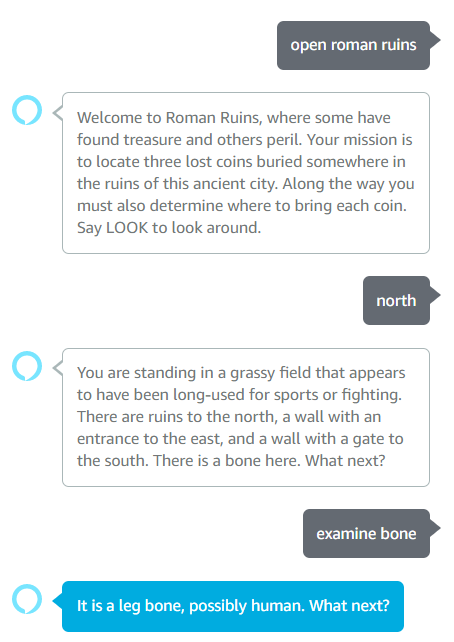
So, what's it like to play this on Alexa? Below is an excerpt. It works pretty well, but you can always do more to handle a wider range of responsesand you particularly feel that when you're working on voice applications.

Playing Roman Ruins Adventure on Alexa

Feel free to play! Try "Alexa, open Roman Ruins" and let me know what you think. As I extend and polish the game my goal is to make better and better. Your feedback will help a great deal.

Previous: Part 1: Nostalgia and Game Design
Next: Part 3: Twitch Minigame


Roman Ruins Adventure, Part 1: Nostalgia and Game Design

In this series of posts I'll share my experiences creating an old-style text Adventure game, adapted somewhat for the 21st century. Here in Part 1, I'll review the original Adventure and why it was such a ground-breaking development. Then I'll go over the design of my own game, called Roman Ruins adventure.

In subsequent posts I'll show how this game is implemented for Alexa as a voice skill, and for Twitch as a mini-game extension.

Adventure, the First Interactive Fiction

As I recently blogged, I love games—but mostly retro games. In high school—before personal computers—we were fortunate indeed that Suffolk County owned a DEC PDP10 timesharing machine and allowed schools in the county to connect to it via teletypewriters over modems. Thus, my first computer experience was this:


No screen, just teletype output on a paper roll. We didn't even have lower-case letters. All pouring out at the dismally slow speed of 110 baud. I'm sure this seems extremely limiting to anyone who is not a baby boomer, but as it was my first computing experience I was all over it. I got my foundation in computing basics this way (and it was far superior to college, where they were still having us punch cards!).

ADVENT, or Colossal Cave Adventure, was a game that had been developed by Will Crowther and Don Woods for the PDP-10. It had become popular among PDP10 installations and was making the rounds; not on the Internet, but via its predecessor, the ARPANET which had a much more limited audience.

Adventure was different from other computer-based games of the time: it described a world and you the player had to explore it. You decided what to do, and your actions had consequences. Will Crowther had based his Colossal Cave Adventure on actual cave exploration he had participated in. As this "book" unfolded, you the player made decisions that changed the narrative. That's why this is considered the first example of interactive fiction.

Adventure was one of those "a minute to learn, a lifetime to master" kind of games. You enter text commands, and an English language description told you where you were and what was going on:

You are standing at the end of a road before a small brick
building.  Around you is a forest.  A small stream flows out
of the building and down a gully.

You typed one or two-word commands to Adventure. For example, you could move around with NORTH, EAST, WEST, SOUTH, UP, and DOWN. There were only a handful of commands to learn.

> EAST

You are inside a building, a well house for a large spring.
There are some keys on the ground here.
There is a shiny brass lamp nearby.
There is tasty food here.
There is a bottle of water here.

Some "rooms" of the adventure contained objects. You could GET or TAKE an object, which would then come along with you as moved to different rooms. You could likewise DROP an object, leaving it in your current room. You could use INVENTORY to get a list of what you were currently carrying.

> TAKE LAMP

Ok.

> TAKE FOOD

Ok.

> INVENTORY

You are currently holding the following:
Brass lantern
Tasty food

Some objects were essential: carrying a lamp might allow you to see in a dark place. Some areas of the game were tough to navigate. Adventure is famous for having ten rooms with an identical description. Upon closer examination, each room has a slightly different description and a careful player can make a map to get through the area. Once that's done, navigation is simple. Another technique is to leave an object in each room.

You are in a little maze of twisty passages, all alike.

As you played the game, you also discovered puzzles to solve and adversaries to deal with. For example, dwarves are troublesome and can kill you or prevent you from moving past them. A novice player might remember encountering food and be tempted to offer it to the dwarf—only to learn something important about dwarves:

> GIVE FOOD
You fool, Dwarves eat only coal! Now you've made him *REALLY* MAD!!

In this manner, by exploring and experimenting, the player learned what was where and what the rules of the road were. There was an artistry in the way places were described: paying attention to descriptions often paid off. Humor and the unexpected were to be found as well.

The limited computer interfaces available at the time didn't hamper Adventure at all, because all the magic happened in your imagination, just like a book.

Adventure Game Derivatives

Adventure Games were a big deal in the 1980s. Several companies produced Adventure games commerically. I remember my brother Lee spending a lot of time with the ZORK games from InfoCom.

Zork III: The Dungeon Master

As the years progressed, there was less interest in the textual Adventure games. Home computers and home game consoles were getting powerful and computer interfaces more sophisticated. The focus was on graphics, color, and sound.

The idea of Adventure Games, though, never stopped being relevant. Many, many games today include similar elements of exploration. For example, the Adventure-style commands are quite apparent in Indiana Jones and the Fate of Atlantis (1992):

Indiana Jones and the Fate of Atlantis

On the original XBOX, I enjoyed Indiana Jones and the Emperor's Tomb (2003). The graphics were sophisticated, the action was controlled with a game controller, and there was a lot of action movement and fighting along the way. But still present were those original ideas from Adventure: a world to explore made up of different rooms; objects to take and use at the appropriate moment; puzzles to solve; and treasure to find.

Indiana Jones and the Emperor's Tomb

I've never played Dungeons and Dragons myself, but I'm aware that many games today have combined elements of that as well as Adventure. That often means a painstaking amount of detail goes into every aspect of the game. Take a look at how detailed the inventory is in Elder Scrolls V: Skyrim.

Skyrim

Adventure in Modern Times

Adventure in its original form may be little-known to younger people, but it hasn't been forgotten. There's a documentary on the history of interactive fiction games called Get Lamp on YouTube by Jason Scott.

You can still play the original adventure today. The AMC Halt and Catch Fire site has an area where you can play the original ADVENT on the web.


You can even play ADVENT via SMS by texting this number: +1 (669) 238-3683.

Believe it or not, the original textual game format still has a loyal following. There's even new game development going on, such as 2018's Alias "The Magpie". Adventure has left quite a legacy.

Alias 'The Magpie' being played on Twitch

My Adventure: Roman Ruins

Given all these fond memories, I decided recently that it was high time I created an Adventure game of my own. I thought to start with something very similar to the original Adventure, then find places where that kind of textual interface made sense in modern times. One idea that occurred to me is the popularity of voice assistants such as Amazon's Alexa: the original Adventure game format fits that mode of communication perfectly. Adventure would also make a nice mini-game, for example a Twitch Extension.

I gave myself one week in which to design a game, implement it for both Alexa and Twitch, and submit them for approval (a second reason I'm doing this is to get experience writing Twitch Extensions). Happily both were approved this morning, which is why I'm starting to blog about them. That being said, I'll readily admit a lot more could be done to extend the game and polish the implementation.

Roman Ruins on Alexa 

Roman Ruins Adventure mini-game on Twitch

Game Design

I decided I would write my game in TypeScript (which transpiles to JavaScript). JavaScript can be run in a huge number of places today, including web browsers and Node.js. But before implementing anything specific I would need to design the game itself.

The program code of a textual Adventure game doesn't tend to be very large or complex: when these games were first created, available memory was limited. Minimally, for data you need an array of rooms, an array of objects, and a handful of variables to keep track of your current room and the state of game puzzles (obstacles and adversaries). Commands are simple phrases such as NORTH, LOOK, INVENTORY, TAKE LAMP, EXAMINE BOTTLE, or GIVE FOOD.

Where the real work lies is in the game data. You've got to come up with a world and describe it well with interesting writing. You've got to decide what rooms there are, what directional connections there are between them, and what objects are placed where. You've go to come up with an objective, and there need to be puzzles to solve in order to get to that objective. You've got to craft a narrative that is helpful but not too helpful. Lastly, humor and learning-along-the-way is a hallmark of Adventure games.

For the setting for my Adventure game, I reflected on a cruise tour of Europe my wife Becky and I took last year for our 25th anniversary. We were particularly impressed with the well-preserved city of Pompeii. I decided I would make my world the ruins of an ancient Roman city, using what we had seen of Pompeii as a model. Plus, I had pictures of Pompeii which might be useful in some game interfaces.

The first thing I needed was a room map, describing the rooms (places) and how one can move from one room to another. Without giving away too much about the game, below is a partial look at my initial map of ground level. The player would start at the South Gate. By paying attention to descriptions and experimentation, he or she would soon learn they could go north to get to a gladiator's field; then east to reach an amphitheatre; and then north to get to a main road. The main road could potentiall leads to a nunber of interesting areas, such as a Roman house or a temple or a public baths. The player might or might not have noticed a statue to the north of the gladiator field, which might or might not become important later on.


Partial Room Map - Ground Level

Just as Will Crowther used his actual experience exploring caves to guide his world design in Colossal Cave Adventure, I am doing the same by using my visit to Pompeii. The above rooms depict actual places I visited. To be sure, I am not doing a full scale model of the city of Pompeii: it's enormous, and I didn't get to see all of it. Rather, I'm taking the places I did visit and interconnecting them in a similar but simplified way. Using real places allows me to furnish compelling descriptions.


Pompeii, the Inspiration for Roman Ruins

My game would need a mission, some objective. I decided to place three coins somewhere in the city: the player would need to locate a bronze coin, a silver coin, and a gold coin; each progressively harder to locate. Then, the player would need to figure out where to bring each of these coins based on examination and clues they would find along the way.

Game Data

The JavaScript data storage for my rooms (partial) looks like this. First, there are constants for each room which is useful in specific game play code. Next is the array of rooms itself. Each is a JavaScript object with properties for
// Room IDs

const SOUTH_GATE = 0;   // Nocera Gate (South Gate)
const PALAESTRA = 1;    // Gladiator practice field
const AMPHITHEATRE = 2; // Amphitheatre
const DECUMANUS_EAST = 3;     // Decumanus Maximus - east

...

// Room detail

  session.rooms = [ 
    { name: "South Gate", // 0 SOUTH_GATE
      visited: true,
      arrival: null,
      look: "You are standing outside an ancient wall. The ground is covered in white ash. To the north is a gate.",
      adversary: null,
      env: null,
      north: PALAESTRA,
      east: null,
      west: null,
      south: null,
      up: null,
      down: null
    },
    { name: "Gladiator Field",  // 1 PALAESTRA 
      visited: false,
      arrival: null,
      look: "You are standing in a grassy field that appears to have been long-used for sports or fighting. There are ruins to the north, a wall with an entrance to the east, and a wall with a gate to the south.",
      adversary: null,
      env: null,
      north: STATUE_CENTAUR,
      east: AMPHITHEATRE,
      west: null,
      south: SOUTH_GATE,
      up: null,
      down: null
    },
    { name: "Amphitheatre",   // 2 AMPHITHEATRE
      visited: false,
      arrival: null,
      look: "You are in a large amphitheatre with stone seating all around. A door leads west. To the north is a road.",
      adversary: null,
      env: null,
      north: DECUMANUS_EAST,
      east: null,
      west: PALAESTRA,
      south: null,
      up: null,
      down: null
    },
    { name: "Decumanus Maximus East", // 3 DECUMANUS_EAST 
      visited: false,
      arrival: null,
      look: "You are at the end of a large east-west main road that cuts across the city to the west. There is an entrance to a large building to the south.",
      adversary: null,
      env: null,
      north: null,
      east: null,
      west: DECUMANUS_CENTER,
      south: AMPHITHEATRE,
      up: null,
      down: null
    },

...
Some of the essential properties for each room include its name, a previously-visited flag, special text to add on first arrival, a look description for the LOOK command, and where the six movement commands lead. There is also an adversary variable which tells the game whether some enemy is lurking in the room. Lastly, an environment variable tracks whether a room has an interesting environment attribute such as being dark: in a dark room you can't see anything unless you happened to bring a light source with you.

Object data is handled the same way: there are constants to make it easy to reference a particular object by name in code, and then an array of objects for each game object.
// Object IDs

const MAX_ITEMS_CARRIED = 5;

const BRONZE_COIN = 0;
const BOTTLE = 1;
const JUG = 2;
const KNIFE = 3;

...

 // Object detail

  session.objects = [ 
  {   name: "bronze coin",        // 0 BRONZE_COIN
      room: HOUSE_MENANDER_YARD,
      examine: "It is an old coin made of bronze with a horse on its face.",
      carrying: false,
      disallow: null,
  },
  {   name: "bottle",
      room: HOUSE_MENANDER_ATRIUM,
      examine: "It is a bottle of wine.",
      carrying: false,
      disallow: null,
  },
  {   name: "jug",
      room: SIDEWALK,
      examine: "It is an empty pottery jug.",
      carrying: false,
      disallow: DOG,
      disallowDesc: "The dog growls fiercely whenever you approach the jug."
  },

...
Object properties include the object's name, so that you can issue commands like TAKE BRONZE COIN or EXAMINE BOTTLE. There's also the room the object is in, an examine description for the EXAMINE command, and a carrying flag to indicate whether the player is currently carrying it. The disallow property, if not null, means the object can't be taken because of an adversary.

Although most rooms can be navigated to with NORTH, EAST, WEST, SOUTH, etc., some rooms are initially not accessible or even hidden. It takes puzzle solving by acquiring, transporting, and using objects to get to those areas. To invent some game puzzles, I considered non-intuitive paths to some places; natural obstacles; beasts that might not let you pass; and people that might not let you take something you need.

Game Code

The game code itself is simple. Each of the available commands needs an implementation:
  • INVENTORY simply lists each item in the objects array where the carrying flag is true.
  • TAKE object checks whether the specified object name exists. If found in the objects array, and in the current room, and not already being carried, the object can be picked up. The carrying flag is set to true and it is now a carried object.
  • DROP object works just like TAKE, except it can only be applied to an object with the carrying flag set to true. The carrying flag is set to false, and the object's room property is set to the current room.
  • The EXAMINE object command searches for an item in the objects array matching the specified name. If found, and the object is being carried or is in the current room, its examine property is described. Special code allows the player to sometimes examine other things, such as a statue in the room.
  • The LOOK command describes your current surroundings. It first displays or speaks rooms[room].description, the general description of the room you're in. It must also tell you if any objects are present. Unless in a dark room without a light source, each item in the object array is described if its room property matches the current room and the carrying flag is false).
  • The GIVE object or USE object command does something special with an object in order to solve a game puzzle such as defeating an adversary. Special game code checks for specific objects. With a more sophisticated implementation, these things could be represented in the game data itself but I was umm... lazy in these initial implementations.
Here's the code that implements directional movement (NORTH, SOUTH, EAST, WEST, UP, DOWN). After identifying a direction command, the room object for the current room's .north, .south, .east, .west, .up, or .down property is passed to the moveTo function. If moveTo is passed a null, movement is impossible. Otherwise, the current room is set to the passed room. If the new room object's visited flag is already true, this is a return to a prior room and a full description is skipped; but the user can always request that with a LOOK command. For interfaces with a visual element, a picture for the current room number is shown (unless it's dark and you have no light source). Other functions are called to also describe what's in the room with you.
  switch(words[0]) {
    ...
        // Move to a new room
        case "NORTH":
        case "N":
          moveTo(session.rooms[session.room].north);
          break;
        case "EAST":
        case "E":
          moveTo(session.rooms[session.room].east);
          break;
        case "WEST":
        case "W":
          moveTo(session.rooms[session.room].west);
          break;
        case "SOUTH":
        case "S":
          moveTo(session.rooms[session.room].south);
          break;
        case "UP":
        case "U":
          moveTo(session.rooms[session.room].up);
          break;
        case "DOWN":
        case "D":
          moveTo(session.rooms[session.room].down);
          break;
  ...

  function moveTo(newRoom) {
    try {
      var text = '';
      if (newRoom != null) {
        session.room = newRoom;
        if (session.rooms[session.room].visited) {
          text = "You're back at " + session.rooms[session.room].name + ". ";
        }
        else {
          if (session.rooms[session.room].arrival!==null)
            text = session.rooms[session.room].arrival + session.rooms[session.room].look + " ";
          else
            text = session.rooms[session.room].look + " ";
          session.rooms[session.room].visited = true;
        }
        session.location = session.rooms[session.room].name;
        session.output = text;
        if (isDark())
          session.imageUrl = image('dark.jpg');
        else
          session.imageUrl = image(session.room.toString() + '.jpg');  
        listObjectsInRoom();
        listAdversariesInRoom();
      }
      else {
        session.output = "I can't move that way. ";
      }
  }
  catch(e) {
      session.output = "An exception occurred";
    console.log("EXCEPTION" + e.toString());
  }
}
In designing an Adventure game, one must try to anticipate everything a player might try. For a consistent and enjoyable game, logical conclusions should be honored: if a player went NORTH to get from Room A to Room B, then SOUTH from Room B should lead back to Room A. There can be exceptions however: since the places we're describing are not necessarily rectangular, we don't always have to honor the obvious routes. Twisty passages in a maze may lead the player to unexpected places; and there may be the occasional magical secret door that whisks the player to a completely different area of the world.

A single-level world is not as interesting as a multi-level world. Most of what I'd seen in Pompeii had been single-story buildings. I could surely invent some higher structures, which would allow some UP and DOWN navigation.

What about a subterranean level? That was a mainstay of Colossal Caves Adventure. Thinking back to our trip to Europe, we had also visited underground catacombs (where early Christians buried their dead), which were networks of many underground rooms. I decided this would make for a good subterranean level in Roman Ruins Adventure, with a handful of places that allow one to travel below ground level and back up. Since the real-world catacombs are mysterious twisty places that are hard to navigate, I would design accordingly. I would also require a light source in order to see anything in these rooms.

Frustratingly, our visit to the Roman catacombs visit didn't allow picture-taking. I decided this would be the place for my version of "Twisty little passages, all alike." I have a similar (but subtly different) description for each area, with the same cave image; unless it's dark, in which case everything is pitch black. I know some players groan when they encounter these areas but since my game is a homage to the original Adventure I really do have to have one.

Conclusion

The original Adventure was ground-breaking and has a large legacy of game infuence that continues on to this day. I spent the last week creating my own Adventure game, on a smaller scale. Today we examined some of the game design. It could be a lot bigger: there are only a couple dozen rooms at present. All it will take to expand it is some creative thought and some more game data.

My week of development targeted creating a basic game, an implementation for Alexa, and an implementation for a Twitch Minigame Extension. I completed all that, but I'll admit there could be a lot more refinement. The game could be expanded with more rooms, more of a narrative to discover, and more game puzzles. The implementations could be more polished and there should be more shared code. I likely will return to all of this and take it further at some point, but I am satisfied with this first week's effort. It was an Adventure!

In Part 2, we'll look at my implementaton of Roman Ruins Adventure for Alexa.

In Part 3, we'll look at my implementation of Roman Ruins Adventure as a Twitch Mini-game.

Next: Part 2: Alexa Skill


Tuesday, February 26, 2019

CIA World Factbook on AWS, Part 3: Alexa Voice Interface using Lambda and DynamoDB

In this 3-part series, I'm showing how you can take CIA World Factbook data and use it for your own purposes on Amazon Web Services. Previously in Part 1 we created the back-end to collect data and store it in DynamoDB and S3 storage, using a Lambda Function to insert document records. In Part 2 we created a Lambda API for data access and a web site for browsing, searching, and viewing charts. Today in Part 3 we're creating an Alexa Skill so that the world country data can be accessed by voice.


What We're Building

Unless you've been living under a rock, you know that Amazon's cloud-based voice service is named Alexa and can be accessed from... well, anywhere: devices like the Amazon Echo and Dot; on your TV via Amazon FireStick; in a variety of cars; and many other places. Even if you don't own an Alexa-enabled device, you can get to right now on the web at https://alexa.amazon.com; or from your phone using the Alexa app.

You can access the country data skill with "Alexa, Open World Country Data".

We are going to create an Alexa Skill (voice app) named World Country Data, backed by a Lambda Function that responds to spoken inquiries. The Lambda Function will query the DynamoDB database to retrieve country data.

World County Data Dialog

The Alexa skill will be able to respond to inquiries like these:

  • What is the population of country?
  • Where is country?
  • How large is country?
  • What language is spoken in country?
  • What are the major cities in country?
  • What countries border country?
  • What are the natural resources of country?
  • What are the agricultural products of country?
  • What are the industries of country?
  • Give me an overview of country
  • Brief me on the economy of country
  • How many mobile phones are in country?
In addition, a user can also inquire about how countries compare and rank:
  • Wha country is the largest?
  • Which countries have the highest exports?
  • What countries have the most Internet users?
  • What country has the lowest population?
We also want the ability to play an audio clip:
  • Play the national anthem of country
Here's what happens architecturally: spoken inquires from users to Alexa undergo speech recognition, machine learning, and natural language processing. Alexa recognizes an intent and passes it to our Lambda Function. Factbook skill looks up the required data from the DynamoDB which contains JSON records for each country. The function returns a speech response, which in some cases may reference an audio clip. For Alexa devices with a display, the response also includes a card, which displays has a map or flag image (depending on device size). Audio clips and images are stored in S3.

Achitecture of World Country Data Skill

Our project will consist of a Alexa Skill (configuration) and a Lambda Function to go with it (code). We'll start with the Alexa skill. Our starting point for the project was the Color Picker sample in Node.js, which provides basic skeleton code for a skill.

Alexa Skill

To avoid potential confusion, I should mention that as I started work on this leg of the project, it came to my attention that there is already an existing World Factbook skill (not from me). Don't confuse that with my skill which is named World Country Data. The two skills are pretty different in scope, however.

Alexa Skills are created in the Amazon developer portal, developer.amazon.com, not the AWS console. You'll need to register as a developer. Our skill is named World Country Data.

The first area to set up in the skill project are the intents. An intent is something a user is trying to communicate, such as What's the population of {country} and contains a list of utterances. Intents are easy and not easy at the same time: it's simple enough to enter some utterances for the intent and try it out on Alexa. What's not so easy is thinking through all the possible ways someone might phrase an inquiry.

Scalar Value Inquiries

One category of intents we'll have is inquires about scalar values, such as What's the population of {country}?, that return a single value (in this case, a number). Here's our definition for the population intent:


The embedded value {country} is called a slot, which is a type of placeholder. We want to be able to ask these questions about any country. Further down in the intent, we see that the slot country is of type country, meaning a custom list of country names we will create.


There have been a number of places in this project where it's been necessary to list 260 individual countries. Defining the possible slot values for country is one of them. My fingers are getting a good work out! Technically speaking, the intents would work without listing every possible country here; however, there's a huge improvement in Alexa's understanding and selecting the right intent when the expected slot values are defined.

Defining country Slot Values

The response to this intent will be provided by our Lanbda Function, which we'll get to later in this post. We create similar intents for area, climate, terrain, literacy rate, and the number of phones. This hardly scratches the surface of the available data; we'll come back and do more someday.

Text Narratives

Some fields in the country JSON contain paragraph text. For example, there's introduction.background, a background preamble on the country; and economy.overview, a brief on a country's economy. Technically, retrieving these items is no different than the scalar values described in the prior section; the experience to the user is quite different, however, as Alexa will read on and on. We handle these kind of inquires in the same way, with intents.

Alexa Dialog: Country Overview

Lists

Some of the World Factbook data is in the form of lists (JSON object arrays), such as a country's agricultural products or major urban areas.

Alexa Dialog: Major Urban Areas

Our intents for lists are not much different than our intents for scalar values: the only slot needed is the country name. However, our Lambda Function will need different code to retrieve list data.

Intent major_cities: Utterances

Top Countries

In addition to asking facts about a particular country, a user might want to know which countries are ranked highest or lowest in various categories like area, population, exports, or inflation. In Part 2 we created Lamba functions and database queries to get this information and render column charts. Today we can use the same queries (such as Top 10 exports) and give a response like this: The countries with the largest area are Russia, Antarctica, and Canada.

Alexa Dialog: Leading Countries

As before, our intents need to consider a variety of utterances that convey the same meaning:

Intent area_highest: Utterances

We create intents for largest/smallest area, highest/lowest population, highest/lowest inflation rate, and most Internet users. We'll look at the backing Lambda functions later in this post. Once again, there's so much additional data we could mine. 

Playing National Anthems

The CIA World Factbook data includes audio clips for most countries' national anthems. Being able to play this audio in the skill is one of my favorite features.

To support this in our skill took some work, because Alexa imposes some limitations on audio clips:
  • Audio clips must be hosted at an HTTPS endpoint.
  • The MP3 must be an MPEG version 2 file.
  • The audio file cannot be longer than 240 seconds.
  • The bit rate must be 48 kbps.
  • The sample rate must be 22050Hz, 24000Hz, or 16000Hz.
These are not great specs for music audio, but we have no choice if we are going to be able to play our clips in our Alexa skill. 

After obtaining the audio clips for each country, it was necessary to transform them to meet the above specifications. Following the AWS guidance on audio conversion, the following steps were performed for each national anthem MP3 file, using a free audio tool named Audacity.
  1. Open the nation anthem MP3.
  2. Change the Audactity projects' sampling rate to 16000.
  3. Export the audio to MP3, setting a bit rate of 48kbps.
Converting Audio files to 48 kbps with Audacity

After converting all the country national anthem files, they were uploaded to S3 which is where the Alexa Skill will play them from. We'll see how when we look at the backing Lambda Function.

Here's a sample national anthem clip for Austria.

Lambda Function

Our Alexa Skill depends on a Lambda Function writtein in Node.js. Starting with the Color Picker sample gives us a basic voice app, which we will now turn into Country World Data. Although this is just one Lambda function, it calls into several sub-functions we'll need to review.

onIntent

The onIntent function responds to an intent by calling an appropriate handler function based on the intent name:

  • Scalar value requests and text briefing requests are handled by the lookup function.
  • List value requests are handled by the lookupList function.
  • Top countries in a category requests are handled by the lookupTop function.
/**
 * Called when the user specifies an intent for this skill.
 */
function onIntent(intentRequest, session, callback) {
    console.log(`onIntent requestId=${intentRequest.requestId}, sessionId=${session.sessionId}`);

    const intent = intentRequest.intent;
    const intentName = intentRequest.intent.name;

    if (intentName === 'about')                 { lookup('introduction.background', '{value}{end}', intent, session, callback); } 
    else if (intentName === 'area')             { lookup('geography.area.total.value', '{country} is {value} square kilometers in size.{end}', intent, session, callback); }  
    else if (intentName === 'climate')          { lookup('geography.climate', '{value}{end}', intent, session, callback); } 
    else if (intentName === 'count_mobile_phones') { lookup('communications.telephones.mobile_cellular.total_subscriptions', 'There are {value} mobile phones in {country}.{end}', intent, session, callback); } 
    else if (intentName === 'count_land_phones') { lookup('communications.telephones.fixed_lines.total_subscriptions', 'There are {value} land lines in {country}.{end}', intent, session, callback); } 
    else if (intentName === 'economy')          { lookup('economy.overview', '{value}{end}', intent, session, callback); } 
    else if (intentName === 'terrain')          { lookup('geography.terrain', '{value}{end}', intent, session, callback); } 
    else if (intentName === 'where')            { lookup('geography.location', '{value}{end}', intent, session, callback); }  
    else if (intentName === 'population')       { lookup('people.population.total', 'The population of {country} is {value}{end}.', intent, session, callback); } 
    else if (intentName === 'urban_population') { lookup('people.urbanization.urban_population.value', 'The urban population of {country} is {value} percent.{end}', intent, session, callback); } 
    else if (intentName === 'literacy_rate')    { lookup('people.literacy.total_population.value', 'The literacy rate of {country} is {value} percent.{end}', intent, session, callback); } 

    else if (intentName === 'play_national_anthem') { lookup(null, '{audio}{end}', intent, session, callback); } 
    
    else if (intentName === 'agricultual_products') { lookupList('economy.agriculture_products.products', null, '{country} has these agricultural products: {list}.{end}', intent, session, callback); } 
    else if (intentName === 'bordered_by')      { lookupList('geography.land_boundaries.border_countries', 'country', '{country} is bordered by: {list}.{end}', intent, session, callback); } 
    else if (intentName === 'industries')       { lookupList('economy.industries.industries', null, '{country} has these industries: {list}.{end}', intent, session, callback); } 
    else if (intentName === 'languages')        { lookupList('people.languages.language', 'name', 'In {country}, these languages are spoken: {list}.{end}', intent, session, callback); } 
    else if (intentName === 'major_cities')     { lookupList('people.major_urban_areas.places', 'place', 'In {country}, the major urban areas are: {list}.{end}', intent, session, callback); } 
    else if (intentName === 'resources')        { lookupList('geography.natural_resources.resources', null, '{country} has these natural resources: {list}.{end}', intent, session, callback); } 

    else if (intentName === 'area_highest')     { lookupTop('report-area-highest', 'The countries with the largest area are {country1}, {country2}, and {country3}.{end}', intent, session, callback); } 
    else if (intentName === 'area_lowest')      { lookupTop('report-area-lowest', 'The countries with the smallest area are {country1}, {country2}, and {country3}.{end}', intent, session, callback); } 
    else if (intentName === 'exports_highest')  { lookupTop('report-exports-highest', 'The countries with the highest exports are {country1}, {country2}, and {country3}.{end}', intent, session, callback); } 
    else if (intentName === 'exports_lowest')   { lookupTop('report-exports-lowest', 'The countries with the lowest exports are {country1}, {country2}, and {country3}.{end}', intent, session, callback); } 
    else if (intentName === 'imports_highest')  { lookupTop('report-imports-highest', 'The countries with the highest imports are {country1}, {country2}, and {country3}.{end}', intent, session, callback); } 
    else if (intentName === 'imports_lowest')   { lookupTop('report-imports-lowest', 'The countries with the lowest imports are {country1}, {country2}, and {country3}.{end}', intent, session, callback); } 
    else if (intentName === 'internet_users_most') { lookupTop('report-internet-users-highest', 'The countries with the most Internet users are {country1}, {country2}, and {country3}.{end}', intent, session, callback); } 

    else if (intentName === 'population_highest') { lookupTop('report-population-highest', 'The countries with the highest population are {country1}, {country2}, and {country3}.{end}', intent, session, callback); } 
    else if (intentName === 'population_lowest') { lookupTop('report-population-lowest', 'The countries with the lowest population are {country1}, {country2}, and {country3}.{end}', intent, session, callback); } 

    else if (intentName === 'AMAZON.HelpIntent') { help(intent, session, callback); } 
    else if (intentName === 'AMAZON.StopIntent' || intentName === 'AMAZON.CancelIntent') { handleSessionEndRequest(callback); }
    else if (intentName === 'AMAZON.FallbackIntent') { huh(intent, session, callback); }

    else { throw new Error('Invalid intent: ' + intentName); }
}
onIntent function

Now let's take a look at our three primary handlers: lookup, lookupList, and lookupTop.

lookup


lookup is called to get a scalar value, such as the people.population.total value in the JSON below.

JSON snippet - Total Population for Greece

We can call the lookup function with the following path to retrieve the population total:

lookup('people.population.total', 'The population of {country} is {value}.{end}', intent, session, callback);

The lookup function is passed a JSON document path; a response template; and intent, session, and callback variables. The intent can be inspected, the session can be used to store or retrieve session state, and the callback is invoked to return a response. Here's the code to lookup:
// --------------- lookup - look up a value - e.g. What is the {property} of {country}? | What is the population of France?
// path: a dotted path to the data, as in people.population.total

function lookup(path, response, intent, session, callback) {

    const repromptText = 'Please ask me a country fact, such as "What is the population of France"?';
    const sessionAttributes = {};
    let shouldEndSession = false;
    let speechOutput = '';
    FlagImageUrl = null;
    MapImageUrl = null;
    let cardTitle = 'World Country Data';
    
    let country = normalizeCountryName(intent.slots.country.value);
    
    if (!inCountryList(country)) { // also sets FlagImageUrl & MapImageUrl if country name recognized
        console.log('lookup: country not recognized: ' + country);
        cardTitle = 'World Country Data - Country Not Recognized';
        speechOutput = 'Sorry, I don\'t recognize that country name. ' + Tag;
        callback(sessionAttributes, buildSpeechletResponse(cardTitle, speechOutput, repromptText, shouldEndSession));
    }
    else {
        cardTitle = 'World Country Data - ' + country;
        const AWS = require('aws-sdk');
        AWS.config.update({region: 'us-east-1'});
        const docClient = new AWS.DynamoDB.DocumentClient({region: 'us-east-1'}); 
    
        var params = {
          TableName: 'factbook',
          ExpressionAttributeNames: {
             '#name': 'name',
             '#source': 'source'
          },
          ExpressionAttributeValues: {
            ':name': country,
            ':source': 'Factbook'
          },
          KeyConditionExpression: '#name = :name and #source = :source'
        };
        
        docClient.query(params, function(err, data) {
    
            if (err) { 
                console.log('lookup: Query Error - ' + err.toString());
                speechOutput = 'Sorry, an error occurred looking up the data.';
                shouldEndSession = true;
            } else { 
                if (!data || data.Items.length===0) {
                    speechOutput = 'Sorry, I found no data. ' + Tag;
                }
                else {
                    try {
                        response = replace(response, '{country}', country);
                        response = replace(response, '{value}', eval('data.Items[0].' + path));
                        response = replace(response, '{end}', Tag);
                        response = replace(response, '{audio}', '<audio src="https://s3.amazonaws.com/factbookaudio/' + replace(country, ' ', '+') + '.mp3"/>');
                        speechOutput = response;
                    }
                    catch(e) {
                        console.log('lookup: Exception - ' + e.toString());
                        speechOutput = "Sorry, I had a problem looking that up.";
                        shouldEndSession = true;
                    }
                }
                    
            // Setting repromptText to null signifies that we do not want to reprompt the user.
            // If the user does not respond or says something that is not understood, the session
            // will end.
            callback(sessionAttributes, buildSpeechletResponse(cardTitle, speechOutput, repromptText, shouldEndSession));
            }
        });
    }
}
lookup function

The above code calls normalizeCountryName to normalize the country name (line 14). Many countries have alternate or historical names a user might refer to, and we need to arrive at a standard name that will match the JSON record in DynamoDB and the filenames in S3. For example, a user can request data on America, the U.S., or the U.S.A. and the country name will be normalized to United States.

Next (lines 16-21) we check whether the country name is in our list of country names. If it isn't, we won't be able to retrieve the requested data and we respond Sorry, I don't recognize that country name. The response speech is routed back by calling buildSpeechletResponse, which we'll review later.

If we do have a recognized country name, it's time to retrieve the requested data. A DynamoDB client is instantiated (lines 24-26), query parameters are set up to retrieve the JSON country record (lines 28-39), and the JSON document is retrieved (lines 41-71). The code uses JavaScript's eval function to get to the data, which isn't a great practice; we'll be looking to rewrite that code in the near future and not use eval.

We've been passing spoken responses and referring to them as templates; this is something I created, not an Alexa feature. To return the spoken response, the template response text passed in has values replaced:

  • {country} is replaced with the normalized country name;
  • {value} is replaced with the desired value by evaluating the property path that was passed in to the function.
  • {audio} is replaced with markup for the national anthem sound clip. 
  • {end} is replaced with a 1-second pause and "What else would you like to know?" prompt.
The response is passed back to Alexa by calling buildSpeechletResponse (line 69).

The response to What is the population of Greece? is The population of Greece is 10 million 761 thousand 523.

lookupList


lookupList is very similar to lookup, but has different code for retrieving the value. Instead of a single property, an array must be iterated through with an inner property extracted to speak. Here's an example of the JSON array for languages in the JSON record for Spain. In this case, the path to the array is people.languages.language but the property to be extracted from each array element is name.


We can call lookupList with the following parameters to extract a list of languages:

lookupList('people.languages.language', 'name', 'In {country}, these languages are spoken: {list}.{end}', intent, session, callback);

Here's the code to lookupList:
// --------------- lookupList - look up a list - e.g. What languages are spoken in {country}? | What ethnic groups live in France?

// path: a dotted path to array data, as in people.languages.language
// property: property of a list item to vocalize - ex: name

function lookupList(path, property, response, intent, session, callback) {

    const repromptText = 'Please ask me a country fact, such as "What is the population of France"?';
    const sessionAttributes = {};
    let shouldEndSession = false;
    let speechOutput = '';
    FlagImageUrl = null;
    MapImageUrl = null;
    let cardTitle = 'World Country Data';
    
    let country = normalizeCountryName(intent.slots.country.value);
    
    if (!inCountryList(country)) { // also sets FlagImageUrl & MapImageUrl if country name recognized
        console.log('lookupList: country not recognized: ' + country);
        cardTitle = 'World Country Data - Country Not Recognized';
        speechOutput = 'Sorry, I don\'t recognize that country name. ' + Tag;
        callback(sessionAttributes, buildSpeechletResponse(cardTitle, speechOutput, repromptText, shouldEndSession));
    }
    else {
        cardTitle = 'World Country Data - ' + country;
        const AWS = require('aws-sdk');
        AWS.config.update({region: 'us-east-1'});
        const docClient = new AWS.DynamoDB.DocumentClient({region: 'us-east-1'}); 
    
        var params = {
          TableName: 'factbook',
          ExpressionAttributeNames: {
             '#name': 'name',
             '#source': 'source'
          },
          ExpressionAttributeValues: {
            ':name': country,
            ':source': 'Factbook'
          },
          KeyConditionExpression: '#name = :name and #source = :source'
        };
        
        docClient.query(params, function(err, data) {
    
            if (err) { 
                console.log('lookupList: Query Error - ' + err.toString());
                speechOutput = 'Sorry, an error occurred looking up the data.';
                shouldEndSession = true;
            } else { 

                if (!data || data.Items.length===0) {
                    speechOutput = 'Sorry, I found no data. ' + Tag;
                }
                else {
                    try {
                        var listText = '';
                        var listData =  eval('data.Items[0].' + path);
                        if (listData != '') {
                            for (var i = 0; i < listData.length; i++) {
                                if (i > 0) {
                                    listText += ", ";
                                }
                                if (property===null) {
                                    listText += listData[i];
                                }
                                else {
                                    listText += listData[i][property];
                                }
                            }
                        }
                        
                        response = replace(response, '{country}', country);
                        response = replace(response, '{list}', listText);
                        response = replace(response, '{end}', Tag);
                        response = replace(response, '{audio}', '<audio src="https://s3.amazonaws.com/factbookaudio/' + replace(country, ' ', '+') + '.mp3"/>');
                        speechOutput = response;
                    }
                    catch(e) {
                        console.log('lookupList: Exception - ' + e.toString());
                        speechOutput = "Sorry, I had a problem looking that up. ";
                        shouldEndSession = true;
                    }
                }
                    
            // Setting repromptText to null signifies that we do not want to reprompt the user.
            // If the user does not respond or says something that is not understood, the session
            // will end.
            callback(sessionAttributes, buildSpeechletResponse(cardTitle, speechOutput, repromptText, shouldEndSession));
            }
        });
    }
}
lookupList function

lookupList is nearly identical to lookup. It also normalizes and validates the country name, and retrieves the JSON country record from DynamoDB. The big difference is lines 56-70 where the code iterates through the array at path and extracts variable property from each array element to form a list to speak. The response template can specify {list} as a placeholder for the list.

The spoken response to What languages are spoken in Spain? is In Spain, these languages are spoken: Castilian Spanish, Catalan, Galician, Basque, Aranese along with Catalan, speakers.

listTop


When a user asks a country ranking question like "which countries are largest?", the listTop function handles the request. listTop runs a query to get a Top 10 country list, such as the 10 countries with largest area. These are the same queries we used to get column charts in the web site in Part 2.

We can call lookupTop with the following parameters to hear the top countries in a category:

lookupTop('report-area-highest', 'The countries with the largest area are {country1}, {country2}, and {country3}.{end}', intent, session, callback);

Here's the code to listTop. The report name parameter is used to set the index, projection expression, and sort direction for the DynamoDB query. The response template may specify {country1}, {country2}, and {country3} for the names of the top 3 countries in the result.
// --------- lookupTop - look up top (leading) countries for a report - e.g. which country has the highest exports?: which countries are biggest?
// report: report name, such as 'report-exports-highest'
// response: speach to output, which may include embeddeed placeholders {country1}, {country2}, {country3}

function lookupTop(report, response, intent, session, callback) {

    const repromptText = 'Please ask me a country fact, such as "What is the population of France"?';
    const sessionAttributes = {};
    let shouldEndSession = false;
    let speechOutput = '';

    var index = null;
    var projectionExpression = null;
    var scanIndexForward = true;
    
    var FlagImageUrl = null;
    var MapImageUrl = null;
    const cardTitle = 'World Country Data';
    
    switch(report) {
        case 'report-area-highest':
            index = 'rank-area-index';
            projectionExpression = "#name, global_rank_area, global_value_area";
            scanIndexForward = true;
            break;
        case 'report-area-lowest':
            index = 'rank-area-index';
            projectionExpression = "#name, global_rank_area, global_value_area";
            scanIndexForward = false;
            break;
        case 'report-exports-highest':
            index = 'rank-exports-index';
            projectionExpression = "#name, global_rank_exports, global_value_exports";
            scanIndexForward = true;
            break;
        case 'report-exports-lowest':
            index = 'rank-exports-index';
            projectionExpression = "#name, global_rank_exports, global_value_exports";
            scanIndexForward = false;
            break;
        case 'report-imports-highest':
            index = 'rank-imports-index';
            projectionExpression = "#name, global_rank_imports, global_value_imports";
            scanIndexForward = true;
            break;
        case 'report-imports-lowest':
            index = 'rank-imports-index';
            projectionExpression = "#name, global_rank_imports, global_value_imports";
            scanIndexForward = false;
            break;
        case 'report-internet-users-highest':
            index = 'rank-internet-users-index';
            projectionExpression = "#name, global_rank_internet_users, global_value_internet_users";
            scanIndexForward = true;
            break;
        case 'report-population-highest':
            index = 'rank-population-index';
            projectionExpression = "#name, global_rank_population, global_value_population";
            scanIndexForward = true;
            break;
        case 'report-population-lowest':
            index = 'rank-population-index';
            projectionExpression = "#name, global_rank_population, global_value_population";
            scanIndexForward = false;
            break;
        default:
            report = null;
            break;
    }
    
    if (report===null) {
        speechOutput = "Sorry, I could not find that data. ";
        shouldEndSession = true;
        callback(sessionAttributes, buildSpeechletResponse(cardTitle, speechOutput, repromptText, shouldEndSession));
    }
    else {
        const AWS = require('aws-sdk');
        AWS.config.update({region: 'us-east-1'});
        const docClient = new AWS.DynamoDB.DocumentClient({region: 'us-east-1'}); 
    
        var params = {
          TableName: 'factbook',
          IndexName: index,
          ExpressionAttributeNames: {
             '#name': 'name',
             '#source': 'source'
          },
          ExpressionAttributeValues: {
            ':source': 'Factbook',
          },
          KeyConditionExpression: '#source = :source',
          ProjectionType : "ALL",
          ProjectionExpression: projectionExpression,
          Limit: 10,
          ScanIndexForward: scanIndexForward
        };
        
        docClient.query(params, function(err, data) {
    
            if(err) { 
                console.log('lookupTop: Error - ' + err.toString());
                 speechOutput = 'Sorry, an error occurred looking that up.';
                 shouldEndSession = true;
            } else { 
                if (!data || data.Items.length===0) {
                    speechOutput = 'Sorry, I found no data. ' + Tag;
                }
                else {
                    try {
                        response = replace(response, '{country1}', data.Items[0].name);
                        response = replace(response, '{country2}', data.Items[1].name);
                        response = replace(response, '{country3}', data.Items[2].name);
                        response = replace(response, '{end}', Tag);
                        speechOutput = response;
                    }
                    catch(e) {
                        console.log('lookupTop: Exception - ' + e.toString());
                        speechOutput = "Sorry, I had a problem looking that up.";
                    }
                }
                    
            // Setting repromptText to null signifies that we do not want to reprompt the user.
            // If the user does not respond or says something that is not understood, the session
            // will end.
            callback(sessionAttributes, buildSpeechletResponse(cardTitle, speechOutput, repromptText, shouldEndSession));
            }
      });
    }
}
listTop Function

The response to Which countries are largest? is The countries with the largest area are Russia, Antarctica, and Canada.


buildSpeechletResponse


We've made several references to a buildSpeechletResponse function, which assembles the response to send back to Alexa. Here's the code to buildSpeechletResponse:

// --------------- Helpers that build all of the responses -----------------------

function buildSpeechletResponse(title, output, repromptText, shouldEndSession) {
    
    var outputSpeech = null;
    
    var cardText = replace(output, '<break time="1s"/>', '\r\n\r\n');
    var pos = cardText.indexOf('<audio');
    if (pos != -1) cardText = 'Playing National Anthem\r\n\r\nWhat else would you like to know?';
    
    if (output.indexOf('<') != -1) {
        outputSpeech = {   // output contains markup (audio, breaks) - output SSML
            type: 'SSML',
            ssml: '<speak>' + output + '</speak>',
        };   
    }
    else {
        outputSpeech = {  // output is just text
            type: 'PlainText',
            text: output
        };
    }

    return {
        outputSpeech: outputSpeech,
        card: {
            type: 'Standard',
            title: `${title}`,
            text: cardText,
            content: `SessionSpeechlet - ${output}`,
            image: {
                "smallImageUrl": FlagImageUrl,
                "largeImageUrl": MapImageUrl
            }
        },
        reprompt: {
            outputSpeech: {
                type: 'PlainText',
                text: repromptText,
            },
        },
        shouldEndSession,
    };
}
buildSpeechletResponse Function

The above code assembles a repsonse that includes an outputSpeech object. In the original sample used as a starting point for this project, outSpeech was just text with a type of 'PlainText'. However, our responses sometimes include <break time="1s"> markup to pause a second; and <audio ...=""> tags to play national anthems. For these reason our response is of type SSML

Certification

Having put the work into creating this skill, I decided to submit it for certification so anyone could use it. This was my first time going through the certification process, and I was pleased to find it a smooth process.

The first step was to polish the voice app as much as I could. Alexa voice apps are easy to get started, but getting them to a good production-ready state is another thing; it requires thinking through all the different ways someone might express an intent and a lot of testing. In particular, it requires getting input from multiple people since you won't think of everything yourself. After convincing my family to assist me with testing, I felt I was ready for my first submission.

The Amazon developer console takes you through a Distribution area for describing your app and answering some questions about it; you can then run a validation and automated test to pick up some low-hanging fruit about areas that need attention. When you're past all that you can submit for certification, then sit back and await feedback email. I submitted my first attempt on a Sunday evening and when I went to my computer Monday morning feedback was waiting for me. There were just two very reasonable issues to address, explained in a helpful way.

One issue had to do with my responses. I'd designed the app to stay open until you expressly tell it to exit; the reasoning being that if you're getting country facts, you probably want to ask a series of questions. The feedback said I could only do that if my responses prompted the user for something more. That was easy to address: now when a question is answered, there's a one-second pause followed by "What else would you like to know?"

The second issue had to do with cards, which is what Alexa displays when used from a device with a display (such as my TV with Amazon FireStick). The default sample app I used as a starting point output very technical titles like 'SpeeachApplet'. I overhaued the card output, and now a card is display that includes a friendly-worded title; a map of the country being described (or its flag on small-size display); and the text of the response. Here for example is the card displayed in response to Where is French Polynesia?

Card Response to "Where is French Polynesia?"

I resubmitted Monday mid-morning, and pass certification overnight. All in all, a satisfying certification process. Here's what the skill listing looks like on Amazon.com:


In Conclusion

In this series, I showed how public-domain data from the CIA World Factbook can be hosted on Amazon Web Services. After bringing that data into DynamoDB and creating a Lambda Function serverless API, and then creating a web site, we tackled an Alexa Skill in this final part of the series. You can access the skill with "Alexa, Open World Country Data".

Our skill was able to answer questions about specific values for a country, such as its population or area; as well as lists such as the languages spoken in a country. Country ranking inquiries can also be made, such as which countries have the lowest exports or highest inflation. Although we covered many data points, there's a great deal more that can be mined out of this data source.