Recently I blogged on the importance of not being a "lopsided" web developer. Meaning, our new HTML5 (etc.) web stack is not only new, it's massive. It's not one technology to learn, it's many. Along with technology there are techniques and architectural patterns to master. I recently gave a talk on the subject at So Cal Code in USC, and my presentation is now up on SlideShare for anyone who'd like to view it.

Showing posts with label Web. Show all posts
Showing posts with label Web. Show all posts
Sunday, October 14, 2012

Monday, September 10, 2012
Are You a Lopsided Web Developer?
Mastering the modern web stack is a challenge, and it can easily lead to lopsided web developers. In this post we’ll explain why that is and what you can do about it.
 Why We’re Lopsided
The web has always been fast-moving but the “HTML5 wave” (which is so much more than HTML) has brought an explosion of change and it is still unfolding around us. There’s not one technology or API to learn, but many; and some of them have a large surface area. We have to learn new techniques to use our new tools properly. And then there’s the all-important skill of being able to properly combine it all into a well-composed solution, which is really something we learn on-the-job through project work. Projects we want to see succeed, not fail.
Given all this flux, it’s quite likely you and your fellow web developers haven’t learned all the necessary skills to the same degree. Did I say likely? Let’s put it more strongly: we’re all jagged, every one of us. Serious web developers realize the need for a deep and ongoing investment in realigning their web skills—but even for those of us who’ve made that commitment, there’s a real danger of being lopsided.
Don’t make the mistake of thinking of your web developers’ maturity in simplistic terms like senior, intermediate, and beginner—there’s variance across skills which leaves most web developers with an odd mix of maturity and immaturity. Assemble a group of these lopsided web developers into a team and you’re taking quite a gamble. If you want a consistent baseline in your web developers, you’ll have to ensure each vital skill has been sufficiently mastered.

Combatting Lopsidedness
Let’s look at some ways to ensure you’ve got the right skills coverage:
1. Clearly Define Your Web Stack
2. Right-Size Your Web Stack
3. Avoid One-Tool-To-Rule-Them-All Syndrome
4. Learn the Soul of Your Web Tools
5. Master Essential Techniques
6. Use Frameworks with Care
7. Don’t Build a Duck: Compose Elegant Solutions
1. Clearly Define Your Web Stack

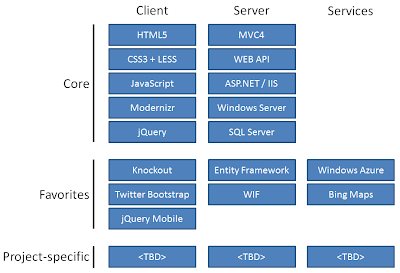
In order to learn the new web stack you’ve got to identify what it is. The new web stack isn’t precisely defined because it is open-ended. On the client side, it begins concretely enough with HTML5, CSS3, and JavaScript, but where it goes from there is your call. Hopefully you include those never-leave-home-without-them core libraries like Modernizr and jQuery. There are oodles of other libraries out there you might also want to leverage. On the server side, you’ll have your preferred server platform and the services you make use of. So, your ideal web stack will be similar but not identical to someone else’s. You want to define your core stack very clearly and ensure all of your fellow developers are on the same page about it and know its components well.
In the consulting practice I lead at Neudesic, our current web stack is shown below. A project team will determine their web stack by starting with a standard core, adding some of our “practice favorites” if they make sense, and possibly additional libraries if the project warrants it (such as a charting library). Teams may depart from the standard stack, but have to justify it—and the greater the departure, the greater the justification needed. Consultants all learn the same standard web stack, and that means they arrive at projects with the same baseline.
2. Have the Right Tools in Your Toolbox

Because the new web stack is open-ended, what you end up with could easily be too small or too large.
If your toolbox is too small, developers are going to misuse some of the tools they do have in order to compensate for what’s missing and end up doing a lot of things the hard way. For example, leaving out Modernizr makes the job of handling browser compatibility quite a bit harder. Or tackling significant DOM manipulation without using jQuery (or an equivalent) will have you writing a whole lot of JavaScript code that could have been a one-liner.
If your toolbox is very large, containing superfluous or seldom-needed tools, that’s going to increase the likelihood of using the wrong tool for the wrong job or add unnecessary baggage to your solution.
3. Avoid One-Tool-To-Rule-Them-All Syndrome
To a man with just a hammer, everything looks like a nail. We’ve already mentioned the danger of having too few tools in your toolbox. But there’s a subtler version of this problem: even if your toolbox has the right collection of tools, it could be that you’ve learned just one of those tools really well and use it to exclusion of everything else. An example of this is doing things in JavaScript code that would be handled more efficiently by leveraging CSS and letting the browser do the work.
4. Learn the Soul of Your Web Tools

Do you know your web technologies and libraries sufficiently well, or do you have gaps? How can you even know?
When learning a tool, memorizing details like syntax matters less than understanding its capabilities, philosophy, and core concepts. You can always look up details online.
Capabilities are something you want to commit to memory. As you think through your solution, it won’t occur to you to use a particular tool if you aren’t aware of what it can do. For example, let’s say you need to do some asynchronous communication with your server. jQuery is a great way to do that—but if you’ve only been thinking of jQuery as a DOM manipulation library it might not occur to you to use it for communication.
Each web technology came into being for a reason, and may have a storied history; knowing that will help you understand its essence. If you grok the philosophy and core concepts of a technology, you’ll find yourself applying it in ways that work well; if not, you’ll sometimes be going against the grain and will run into trouble. For example, CSS exists to separate markup from styling. If you’re aware of and appreciate that intent, you’ll be hesitant to put style attributes directly in your markup.
It’s also necessary to appreciate that some technologies have a dark side that should be avoided. A prime example is JavaScript, a language with some very neat dynamic qualities but also quite a few flaws and oddities. This prompted Douglas Crockford to write JavaScript: The Good Parts, in which he differentiates between the good parts of JavaScript and those areas that should be avoided at all costs. Limiting yourself to the acceptable subset of a technology is a winning strategy in my book.
If you’ve gotten to know the soul of a tool, then books, articles, code samples, etc. from authoritative sources will make eminent sense to you; your own work will progress readily, and you may have one or more “breakthrough moments”. If you find yourself being confused, that suggests you don’t understand the tool’s essence yet.
5. Master Essential Techniques

Craftsmen not only know their tools well, they have mastered essential techniques. Modern web development also requires techniques. Three essential ones are responsive web design, handling browser compatibility, and supporting touch.
Responsive Web Design allows web sites to adapt to different devices and screens large and small. CSS Media Queries are used to invoke conditional style rules based on screen size or other device characteristics. The basic idea of RWD is easily understood, but the finer points often escape developers. Developers should read through Ethan Marcotte’s book Responsive Web Design and keep up with the latest online thinking about the nuances of RWD such as responsive content and responsive images. You can get some aspects of RWD for free by using responsive frameworks such as Twitter Bootstrap, but web developers still need to understand and apply the technique in their own work.
Handling browser compatibility is easier than it used to be but it isn’t automatic and requires attention by designers and web developers. Web projects should always clearly specify the target devices and browser versions. Using the Modernizr library and other shims and polyfills, the latest HTML5 features can be detected and used when present, or replaced by fallback behaviors when not available. You should always provide an intentional experience, even for unsupported devices or when JavaScript isn’t permitted to run.
If you’re going to be supporting mobile devices you’ll need to be sure you are supporting touch well. Your user interface design needs to ensure visual elements are not only large enough to click but large enough to touch. Don’t depend on affordances like hovering that apply to a mouse but not to a finger. While a simple finger tap will be treated like a mouse-click by your browser, sophisticated touch support requires specific programming.
6. Use Frameworks with Care

The web abounds with frameworks, many of them free, open source, and of high quality. Let’s define a framework as more than a passive library and less than a platform. Frameworks are essential but also a two-edged sword: you certainly want to be using some because of the power they provide, but it can be a problem to use the wrong ones or to have too many in the mix. There’s nothing more frustrating than to get into a fragile state where you have many JavaScript libraries and they are fighting each other.
The best frameworks follow the principles of unobtrusive JavaScript. They don’t get in the way, and they play nicely with other frameworks. jQuery and Modernizr are examples. It’s a good idea to endorse frameworks you have come to trust for general use, whereas “newcomer” frameworks should be put on a probationary status until they have proven themselves.
From client-side scaffolding like Twitter Bootstrap to server-side ORMs like Microsoft's Entity Framework, using a framework inherently means you are surrendering some degree of control to the framework. Don't lose control, which can happen if you don't sufficiently understand the framework.
Some frameworks such as Knockout or Backbone provide automated behaviors like data binding. Automatic behaviors can be fantastic, but it’s at this point where you to start to run into trouble if you're reckless. Avoid over-using automatic frameworks beyond sensible levels and keep in mind that automatic behaviors usually impose a certain amount of overhead.
Lastly, even if you’ve approved a number of frameworks for general use that doesn’t mean you always need to be using them. It’s pointless to include a framework just because you’re used to doing so. If it isn’t actually doing something useful for you, ask yourself why it is there.
One of Kurt Vonnegut’s eight writing tips is, “Every sentence must do one of two things—reveal character or advance the action.” I’d like to propose a web equivalent: “Every element of your web solution must do one of two things—help create the user experience or provide useful functionality.”
7. Don’t Build a Duck; Compose Elegant Solutions

A duck can walk, fly, and swim—but doesn’t do any of these things well. Don’t build a duck.
Individual tools and techniques have to be combined well in order to create a satisfactory web solution, and that is another skill area that needs to be updated for the modern web stack: artful composition in solution design. Make the right technical decisions and compose them elegantly, and you end up with a Maserati. Fail to do so and you can end up with an overly-complex result resembling a Rube Goldberg device.
We’ve all seen monstrous, hopelessly-tangled markup, CSS, or JavaScript code in our time. If you’ve been developing for any period of time you’ve hopefully also encountered at least once in your career code that shines and feels amazingly right. Well-organized, easy and intuitive to understand, well-balanced, easily extended, artfully combined. Don’t settle for less in your modern web solutions. If what you’re building feels forced, complex, cumbersome, unwieldy, fragile, or out of control it probably is. Go back to the drawing board and start over or refactor.
There are some new application models and design patterns out there, such as Single Page Applications and CQRS, which are exciting but shouldn’t be jumped into blindly. Expect anything new to carry some elements of risk until you know them well enough. Budget time for on-the-job learning and refactoring; it’s unrealistic not to. Since solution design is ultimately learned on-the-job, oversight and mentoring by your most experienced people is critical.
Closing Thoughts
Learning the modern web stack is both a necessity and an opportunity. Preparing for it should not be under-estimated. Avoid being a lopsided web developer by recognizing all of the skills you need to have and committing to mastering each of them to a sufficient level of maturity.
Take advantage of the fact that you are not alone in this. Work with others to help identify and close each other’s gaps. Leverage the many great online web resources and communities as the world's web developers help each other get to where they need to be.

The web has always been fast-moving but the “HTML5 wave” (which is so much more than HTML) has brought an explosion of change and it is still unfolding around us. There’s not one technology or API to learn, but many; and some of them have a large surface area. We have to learn new techniques to use our new tools properly. And then there’s the all-important skill of being able to properly combine it all into a well-composed solution, which is really something we learn on-the-job through project work. Projects we want to see succeed, not fail.
Given all this flux, it’s quite likely you and your fellow web developers haven’t learned all the necessary skills to the same degree. Did I say likely? Let’s put it more strongly: we’re all jagged, every one of us. Serious web developers realize the need for a deep and ongoing investment in realigning their web skills—but even for those of us who’ve made that commitment, there’s a real danger of being lopsided.
Don’t make the mistake of thinking of your web developers’ maturity in simplistic terms like senior, intermediate, and beginner—there’s variance across skills which leaves most web developers with an odd mix of maturity and immaturity. Assemble a group of these lopsided web developers into a team and you’re taking quite a gamble. If you want a consistent baseline in your web developers, you’ll have to ensure each vital skill has been sufficiently mastered.


Combatting Lopsidedness
Let’s look at some ways to ensure you’ve got the right skills coverage:
1. Clearly Define Your Web Stack
2. Right-Size Your Web Stack
3. Avoid One-Tool-To-Rule-Them-All Syndrome
4. Learn the Soul of Your Web Tools
5. Master Essential Techniques
6. Use Frameworks with Care
7. Don’t Build a Duck: Compose Elegant Solutions
1. Clearly Define Your Web Stack

In order to learn the new web stack you’ve got to identify what it is. The new web stack isn’t precisely defined because it is open-ended. On the client side, it begins concretely enough with HTML5, CSS3, and JavaScript, but where it goes from there is your call. Hopefully you include those never-leave-home-without-them core libraries like Modernizr and jQuery. There are oodles of other libraries out there you might also want to leverage. On the server side, you’ll have your preferred server platform and the services you make use of. So, your ideal web stack will be similar but not identical to someone else’s. You want to define your core stack very clearly and ensure all of your fellow developers are on the same page about it and know its components well.
In the consulting practice I lead at Neudesic, our current web stack is shown below. A project team will determine their web stack by starting with a standard core, adding some of our “practice favorites” if they make sense, and possibly additional libraries if the project warrants it (such as a charting library). Teams may depart from the standard stack, but have to justify it—and the greater the departure, the greater the justification needed. Consultants all learn the same standard web stack, and that means they arrive at projects with the same baseline.

2. Have the Right Tools in Your Toolbox

Because the new web stack is open-ended, what you end up with could easily be too small or too large.
If your toolbox is too small, developers are going to misuse some of the tools they do have in order to compensate for what’s missing and end up doing a lot of things the hard way. For example, leaving out Modernizr makes the job of handling browser compatibility quite a bit harder. Or tackling significant DOM manipulation without using jQuery (or an equivalent) will have you writing a whole lot of JavaScript code that could have been a one-liner.
If your toolbox is very large, containing superfluous or seldom-needed tools, that’s going to increase the likelihood of using the wrong tool for the wrong job or add unnecessary baggage to your solution.
3. Avoid One-Tool-To-Rule-Them-All Syndrome

To a man with just a hammer, everything looks like a nail. We’ve already mentioned the danger of having too few tools in your toolbox. But there’s a subtler version of this problem: even if your toolbox has the right collection of tools, it could be that you’ve learned just one of those tools really well and use it to exclusion of everything else. An example of this is doing things in JavaScript code that would be handled more efficiently by leveraging CSS and letting the browser do the work.
4. Learn the Soul of Your Web Tools

Do you know your web technologies and libraries sufficiently well, or do you have gaps? How can you even know?
When learning a tool, memorizing details like syntax matters less than understanding its capabilities, philosophy, and core concepts. You can always look up details online.
Capabilities are something you want to commit to memory. As you think through your solution, it won’t occur to you to use a particular tool if you aren’t aware of what it can do. For example, let’s say you need to do some asynchronous communication with your server. jQuery is a great way to do that—but if you’ve only been thinking of jQuery as a DOM manipulation library it might not occur to you to use it for communication.
Each web technology came into being for a reason, and may have a storied history; knowing that will help you understand its essence. If you grok the philosophy and core concepts of a technology, you’ll find yourself applying it in ways that work well; if not, you’ll sometimes be going against the grain and will run into trouble. For example, CSS exists to separate markup from styling. If you’re aware of and appreciate that intent, you’ll be hesitant to put style attributes directly in your markup.
It’s also necessary to appreciate that some technologies have a dark side that should be avoided. A prime example is JavaScript, a language with some very neat dynamic qualities but also quite a few flaws and oddities. This prompted Douglas Crockford to write JavaScript: The Good Parts, in which he differentiates between the good parts of JavaScript and those areas that should be avoided at all costs. Limiting yourself to the acceptable subset of a technology is a winning strategy in my book.
If you’ve gotten to know the soul of a tool, then books, articles, code samples, etc. from authoritative sources will make eminent sense to you; your own work will progress readily, and you may have one or more “breakthrough moments”. If you find yourself being confused, that suggests you don’t understand the tool’s essence yet.
5. Master Essential Techniques

Craftsmen not only know their tools well, they have mastered essential techniques. Modern web development also requires techniques. Three essential ones are responsive web design, handling browser compatibility, and supporting touch.
Responsive Web Design allows web sites to adapt to different devices and screens large and small. CSS Media Queries are used to invoke conditional style rules based on screen size or other device characteristics. The basic idea of RWD is easily understood, but the finer points often escape developers. Developers should read through Ethan Marcotte’s book Responsive Web Design and keep up with the latest online thinking about the nuances of RWD such as responsive content and responsive images. You can get some aspects of RWD for free by using responsive frameworks such as Twitter Bootstrap, but web developers still need to understand and apply the technique in their own work.
Handling browser compatibility is easier than it used to be but it isn’t automatic and requires attention by designers and web developers. Web projects should always clearly specify the target devices and browser versions. Using the Modernizr library and other shims and polyfills, the latest HTML5 features can be detected and used when present, or replaced by fallback behaviors when not available. You should always provide an intentional experience, even for unsupported devices or when JavaScript isn’t permitted to run.
If you’re going to be supporting mobile devices you’ll need to be sure you are supporting touch well. Your user interface design needs to ensure visual elements are not only large enough to click but large enough to touch. Don’t depend on affordances like hovering that apply to a mouse but not to a finger. While a simple finger tap will be treated like a mouse-click by your browser, sophisticated touch support requires specific programming.
6. Use Frameworks with Care

The web abounds with frameworks, many of them free, open source, and of high quality. Let’s define a framework as more than a passive library and less than a platform. Frameworks are essential but also a two-edged sword: you certainly want to be using some because of the power they provide, but it can be a problem to use the wrong ones or to have too many in the mix. There’s nothing more frustrating than to get into a fragile state where you have many JavaScript libraries and they are fighting each other.
The best frameworks follow the principles of unobtrusive JavaScript. They don’t get in the way, and they play nicely with other frameworks. jQuery and Modernizr are examples. It’s a good idea to endorse frameworks you have come to trust for general use, whereas “newcomer” frameworks should be put on a probationary status until they have proven themselves.
From client-side scaffolding like Twitter Bootstrap to server-side ORMs like Microsoft's Entity Framework, using a framework inherently means you are surrendering some degree of control to the framework. Don't lose control, which can happen if you don't sufficiently understand the framework.
Some frameworks such as Knockout or Backbone provide automated behaviors like data binding. Automatic behaviors can be fantastic, but it’s at this point where you to start to run into trouble if you're reckless. Avoid over-using automatic frameworks beyond sensible levels and keep in mind that automatic behaviors usually impose a certain amount of overhead.
Lastly, even if you’ve approved a number of frameworks for general use that doesn’t mean you always need to be using them. It’s pointless to include a framework just because you’re used to doing so. If it isn’t actually doing something useful for you, ask yourself why it is there.
One of Kurt Vonnegut’s eight writing tips is, “Every sentence must do one of two things—reveal character or advance the action.” I’d like to propose a web equivalent: “Every element of your web solution must do one of two things—help create the user experience or provide useful functionality.”
7. Don’t Build a Duck; Compose Elegant Solutions

A duck can walk, fly, and swim—but doesn’t do any of these things well. Don’t build a duck.
Individual tools and techniques have to be combined well in order to create a satisfactory web solution, and that is another skill area that needs to be updated for the modern web stack: artful composition in solution design. Make the right technical decisions and compose them elegantly, and you end up with a Maserati. Fail to do so and you can end up with an overly-complex result resembling a Rube Goldberg device.
We’ve all seen monstrous, hopelessly-tangled markup, CSS, or JavaScript code in our time. If you’ve been developing for any period of time you’ve hopefully also encountered at least once in your career code that shines and feels amazingly right. Well-organized, easy and intuitive to understand, well-balanced, easily extended, artfully combined. Don’t settle for less in your modern web solutions. If what you’re building feels forced, complex, cumbersome, unwieldy, fragile, or out of control it probably is. Go back to the drawing board and start over or refactor.
There are some new application models and design patterns out there, such as Single Page Applications and CQRS, which are exciting but shouldn’t be jumped into blindly. Expect anything new to carry some elements of risk until you know them well enough. Budget time for on-the-job learning and refactoring; it’s unrealistic not to. Since solution design is ultimately learned on-the-job, oversight and mentoring by your most experienced people is critical.
Closing Thoughts
Learning the modern web stack is both a necessity and an opportunity. Preparing for it should not be under-estimated. Avoid being a lopsided web developer by recognizing all of the skills you need to have and committing to mastering each of them to a sufficient level of maturity.
Take advantage of the fact that you are not alone in this. Work with others to help identify and close each other’s gaps. Leverage the many great online web resources and communities as the world's web developers help each other get to where they need to be.
Monday, August 27, 2012
Microsoft Certification Exam 70-480: Programming HTML5 with JavaScript and CSS3
If you've been updating your web skills and have been looking for a good way to demonstrate that you know your stuff, Microsoft's new MCSD Web Applications track is a good choice. The first exam you'll want to take (just released) is 70-480: Programming HTML5 with JavaScript and CSS3. Two other courses will be available in October on MVC4 and Windows Azure / Web Services.
This trio is perfect, covering client-side open standards web development, the Microsoft web platform on the server, and the Microsoft cloud platform. I'll admit I've been kind of cool toward Microsoft certifications in recent years as some of them seemed behind the times--but now that they are being updated with current technologies I'm very excited to have a good way to validate modern web skills.
I took and passed the 70-480 exam today, and although I was well-prepared for the subject matter I found the exam quite challenging. If someone passes this exam, they have my respect. You can't guess your way to a passing score.
Although I'm not permitted to share any details about the exam questions, I will share how I prepared for it:
• Pluralsight Online Training. My colleagues and I have been taking Pluralsight online training for about 10 months now. Pluralsight courses are done well and are taught by knowledgeable instructors. Although Pluralsight courses do have assessments, they are usually only around 8 questions or so. As such, I don't consider them sufficient in terms of coverage.
• Build Stuff. You've got to take these technologies you're learning about and build stuff with them. This is absolutely necessary. If you don't have HTML5/CSS/JavaScript project work readily available, do something on your own. One way or another, get hands-on experience: head knowledge alone won't cut it.
• w3schools. I like the http://w3schools.com site a lot: it's easy to navigate, is succinct, and includes lots of try-it-yourself examples with an easy to use online editor / test facility. Just before my exam, I browsed just about every page on HTML/HTML5, CSS, and JavaScript to fill gaps and refresh my memory. However, you should be aware this site has some accuracy problems. There are some better online references out there in terms of accuracy, but so far I haven't found them terribly accessible.
This exam--and the upcoming rest of the MCSD Web Applications certification track--are here just at the right time. I'm looking forward to taking the other exams in October.
This trio is perfect, covering client-side open standards web development, the Microsoft web platform on the server, and the Microsoft cloud platform. I'll admit I've been kind of cool toward Microsoft certifications in recent years as some of them seemed behind the times--but now that they are being updated with current technologies I'm very excited to have a good way to validate modern web skills.
I took and passed the 70-480 exam today, and although I was well-prepared for the subject matter I found the exam quite challenging. If someone passes this exam, they have my respect. You can't guess your way to a passing score.
Although I'm not permitted to share any details about the exam questions, I will share how I prepared for it:
• Pluralsight Online Training. My colleagues and I have been taking Pluralsight online training for about 10 months now. Pluralsight courses are done well and are taught by knowledgeable instructors. Although Pluralsight courses do have assessments, they are usually only around 8 questions or so. As such, I don't consider them sufficient in terms of coverage.
• Build Stuff. You've got to take these technologies you're learning about and build stuff with them. This is absolutely necessary. If you don't have HTML5/CSS/JavaScript project work readily available, do something on your own. One way or another, get hands-on experience: head knowledge alone won't cut it.
• w3schools. I like the http://w3schools.com site a lot: it's easy to navigate, is succinct, and includes lots of try-it-yourself examples with an easy to use online editor / test facility. Just before my exam, I browsed just about every page on HTML/HTML5, CSS, and JavaScript to fill gaps and refresh my memory. However, you should be aware this site has some accuracy problems. There are some better online references out there in terms of accuracy, but so far I haven't found them terribly accessible.
This exam--and the upcoming rest of the MCSD Web Applications certification track--are here just at the right time. I'm looking forward to taking the other exams in October.
Monday, June 25, 2012
Presentation: Make Your Boring Business Software Compelling with Gamification
Here's my presentation on "Making Your Boring Business Software Compelling with Gamification", first given at SoCal Code Camp San Diego. We had a good turnout and some great discussions about the exciting, emerging discipline of gamification in user experience.
For too long we have had software that was either fun or useful, but not both: we call software that is fun but not useful 'games', and most business software can certainly be described as useful but not fun. It's time to change all that! Gamification applies gaming techniques to non-game software to make them more compelling. This increases user loyalty and productivity.
For too long we have had software that was either fun or useful, but not both: we call software that is fun but not useful 'games', and most business software can certainly be described as useful but not fun. It's time to change all that! Gamification applies gaming techniques to non-game software to make them more compelling. This increases user loyalty and productivity.
Friday, June 1, 2012
Presentation: The Modern Web, Part 4: Cloud Computing
Here's the presentation from Part 4 of our Modern Web webcast series, which discusses the importance of Cloud Computing in modern web solutions. You can find the recordings of our webcasts at neudesic.com.
The Modern Web, Part 1: Mobility
The Modern Web, Part 2: HTML5
The Modern Web, Part 3: Social Networking
The Modern Web, Part 4: Cloud Computing
The Modern Web, Part 1: Mobility
The Modern Web, Part 2: HTML5
The Modern Web, Part 3: Social Networking
The Modern Web, Part 4: Cloud Computing
Tuesday, April 24, 2012
Presentation: The Modern Web, Part 3: Social Networking
Today I gave a public Neudesic webcast, The Modern Web, Part 3: Social Networking. Below is the presentation from the webcast. The webcast recording should also be available soon at neudesic.com .
Monday, April 16, 2012
Outside-the-Box Pizza, Part 4: Social Integration with Twitter
In this
series, we’re looking at Outside-the-Box Pizza, a web-mobile-social-cloud
demo, from a variety of perspectives that include design, technologies, and
techniques. The online demo is at http://outsidetheboxpizza.com.
Here in Part 4, we’ll be looking at the social experience which in this app
revolves around the use of Twitter. We’ll
look at three things:
• Social Media Strategy
• Gamification in the Online Experience
• Twitter Integration with @Anywhere
• Gamification in the Online Experience
• Twitter Integration with @Anywhere
Social Media Strategy:
“Pizza as Individual as You Are”
Outside-the-Box Pizza knows the power of the mobile and
social phenomenon, and has crafted their company around appealing to the young,
hip crowd who live the digital lifestyle. From Day 1, their strategy has been
emphasizing the uniqueness and creativity of individuals. That’s why they have
the name they do, and it’s why they provide some very unusual pizza toppings (like
elk and mashed potato), shapes (square, heart), and sauces (BBQ, chocolate).
This fits very well with today’s ever-growing mobile-and-social communities.
Their tag line is, “Pizza as individual as you are”.

Outside-the-Box Pizza is savvy about modern online marketing
and is very much aware of the important role social media plays in keeping an
ongoing relationship with new and existing customers (see Flip
the Funnel by Joseph Jaffe for more on that).
There are many ways to integrate with social networks: you
can view/search content, post content, and allow sign-in with social
identities. There are also many social networks to choose from. Outside-the-Box
Pizza has chosen to focus their efforts around Twitter, where clients will
tweet about unusual pizzas. Outside-the-Box Pizza will tweet as well.
Gamification in the
Online Experience
When a customer orders a unique pizza, Outside-the-Box Pizza
wants them to tweet about it. On the Tweetza Pizza page, clients can see the twitter
feed for #outsideboxpizza and, if they wish, sign in with a Twitter id and add
their own tweets. Of course, they can also do this directly via Twitter itself,
but there’s value in integrating it with the application.

It isn’t necessary for users to identify themselves to view
the Twitter feed, but in order to send tweets they do need to sign in. Clicking
on the Connect with Twitter button
brings up a Twitter sign-in dialog.
To promote the most interesting pizzas, Outside-the-Box
Pizza has a section of the site called Cool Pizzas which is manually curated by
an editor.

Twitter Integration
with Twitter @Anywhere
Social network integration is possible from the front-end or
the back-end of a web application. In this case, Outside-the-Box Pizza uses
front-end integration. That is, all of the integration work is being done in
the HTML/JavaScript layer that runs in the web browser. Twitter provides an
easy-to-use API for this named @Anywhere.
The first step in using @Anywhere is to register an
application. In doing this you’ll identify the ultimate deployment URL of your
application and receive both a consumer key and a consumer secret which will be
used to positively identify your application as legitimate.

In the web application, we load the Twitter @Anywhere
JavaScript library with a script line like this in the section of
the web site.
<script src="http://platform.twitter.com/anywhere.js?id=yxWqT5gTZ4pfhw&v=1"
type="text/javascript">script>
The result of this is that we’ll have a JavaScript object named twttr that we can reference for various behaviors.
Connect Button
To add a Connect to
Twitter button to the site, we turn a placeholder div into a live sign-in
interface using this invocation on the twttr object:
<script>
twttr.anywhere(function (T) {
T("#login").connectButton({ size: "medium" });
});
script>

Tweet Box
To put up a tweet box, we invoke it this way. This pre-loads
the tweet box with the hashtag “#outsideboxpizza”.
twttr.anywhere(function
(T) {
var width = document.getElementById('logo').offsetWidth - 20;
T("#tbox").tweetBox(
{
height: 60,
width: width,
defaultContent: "#outsideboxpizza "
});
});

Twitter Feed
Although we can also use the twttr object to get the Twitter
feed for our hashtag, we chose here to use jTweetsAnywhere jQuery
library which encapsulates the logic and nicely formats the display for us.
After loading its JavaScript and CSS scripts, this code gives us our feed:
$('#tweetFeed').jTweetsAnywhere({
searchParams: 'q=outsideboxpizza',
count: 5,
showTweetFeed: {
showProfileImages: true,
showUserScreenNames: true,
showUserFullNames: true,
showActionReply: true,
showActionRetweet: true,
showActionFavorite: true,
autorefresh: {
mode: 'auto-insert',
interval: 30
}
},
showTweetBox: false
});

Summary
Social integration is a key concern for modern web software.
Outside-the-Box Pizza focuses on Twitter integration in the front end, using
the Twitter @Anywhere API. The result is an ongoing social touchpoint with
customers. Through the use of gamification, what might be viewed as a commodity,
pizza, has been made into a fun, creative experience that consumers want to brag
about over Twitter.
Next: Part 5: Hosting The Front End in the Cloud
Next: Part 5: Hosting The Front End in the Cloud
Monday, March 26, 2012
Outside-the-Box Pizza, Part 1: A Social, Mobile, and Cloudy Modern Web Application
In this series we’ll be showing how we developed
Outside-the-Box Pizza, a modern web application that combines HTML5, mobility,
social networking, and cloud computing—by combining open standards on the front end with the Microsoft web and cloud platforms on the back end. This is a public online demo
developed by Neudesic.

Outside-the-Box Pizza’s name is a reference to the company’s strategy of stressing individuality and pursuing the younger mobile-social crowd. In addition to “normal” pizza, they offer unusual shapes (such as heart-shaped) and toppings (such as elk and mashed potato). The web site works on tablets and phones as well as desktop browsers. The site integrates with Twitter, and encourages customers to share their unusual pizzas over the social network. The most unusual pizzas are given special recognition.
• Web Client: HTML5, CSS, JavaScript, jQuery, Modernizr
• Mobility: Responsive Web Design, CSS Media Queries
• Web Server: MVC4, ASP.NET, IIS, Windows Server
• Cloud: Windows Azure Compute, Storage, SQL Azure DB, CDN, Service Bus
• Social: Twitter
Again, we’ll go into detail about these technologies in subsequent posts.


Summary
Next: Part 2: HTML5, CSS, and Browser Compatibility
Here in Part 1 we’ll provide an overview of the application,
and in subsequent parts we’ll delve into the individual technologies individually.

Scenario: A National
Pizza Chain
The scenario for Outside-the-Box Pizza is a [fictional]
national pizza chain with 1,000 stores across the US. All IT is in the cloud:
the web presence is integral not only to customers placing orders but also
to store operation, deliveries, and enterprise management.Outside-the-Box Pizza’s name is a reference to the company’s strategy of stressing individuality and pursuing the younger mobile-social crowd. In addition to “normal” pizza, they offer unusual shapes (such as heart-shaped) and toppings (such as elk and mashed potato). The web site works on tablets and phones as well as desktop browsers. The site integrates with Twitter, and encourages customers to share their unusual pizzas over the social network. The most unusual pizzas are given special recognition.
Technologies Used
Outside-the-Box Pizza uses the following technologies and
techniques:• Web Client: HTML5, CSS, JavaScript, jQuery, Modernizr
• Mobility: Responsive Web Design, CSS Media Queries
• Web Server: MVC4, ASP.NET, IIS, Windows Server
• Cloud: Windows Azure Compute, Storage, SQL Azure DB, CDN, Service Bus
• Social: Twitter
Again, we’ll go into detail about these technologies in subsequent posts.
Home Page
On the home page, customers can view suggested special
offers as well as videos showing how Outside-the-Box Pizza prepares its pizzas.
The first video shows fresh ingredients, and the second video shows artisan pizza
chefs practicing their craft.
The web site adapts layout for mobile devices, using the techniques of responsive web design. Here’s how it
appears on an iPad:

And here’s how it appears on a smartphone:

On the Order page, customers can design their masterpiece.
Pizzas come in round, square, heart, and triangle shapes. Sauce choices are
tomato, alfredo, bbq, and chocolate. Toppings are many and varied, a mix of
traditional and non-traditional. Customers click or touch the options they
want, enter their address, and click Order to place their order.


Order Fulfillment
Once an order has been placed, customers see a simulation of
order fulfillment on the screen. Since this is a demo and we don’t actually
have stores out there making pizzas, the ordering process is simulated. It’s also
speeded up to take about a minute so we don’t have to wait 30-45 minutes as we
would in real life.
The order is first transmitted to the web site back end in
the cloud and placed in a queue for the target store.

As the order is received by the store, the pizza dough is
made and sauce and toppings are added. After that, the pizza goes into the oven for baking.

After baking, the pizza is sent out for delivery. Once
delivered to your door, order fulfillment is complete.

Social Media
On the Tweetza Pizza page, customers can view the Twitter
feed for the #outsideboxpizza hashtag or post their own tweets. 
To post a tweet, the user clicks the Connect with Twitter
button and signs in to Twitter. They can then send tweets through the
application.


The Store View
In the individual pizza stores, each store can view online
orders. Orders are distributed to each store through cloud queues: each of the
1,000 stores has its own orders queue. The appropriate store is determined from
the zip code of the order.
Once a pizza has been prepared, a delivery order is queued
for the driver.
Driver View
Drivers get a view of delivery orders, integrated to Bing
Maps so they can easily determine routes.
Enterprise Sales Activity
View
Lastly, the enterprise can view the overall sales activity
from the Sales page. Unit sales and revenue can be examined for day, month, or
year; and grouped by national region, state, or store.
Summary
Outside-the-Box Pizza a modern web application: it's social,
mobile, and cloud-based. Together the use of HTML5, adaptive layout for mobile devices, and cloud computing mean it can be run anywhere and everywhere: it has broad reach.
Outside-the-box-Pizza can be demoed online at http://outsidetheboxpizza.com. We aren’t quite ready to share the source code to
Outside-the-Box Pizza yet—it’s still a work-in-progress, and we need to replace
some licensed stock photos and a commercial chart package before we can do
that. However, it is our eventual goal to make source available.Next: Part 2: HTML5, CSS, and Browser Compatibility
Thursday, March 22, 2012
Presentation: The Modern Web, Part 2: HTML5
Today I gave Part 2 in our Neudesic webcast series on The Modern Web (you can get webcast details and after-the-fact recordings at Neudesic.com). In each part I talk about one of the four pillars (Mobility, HTML5, Social Networking, and Cloud Computing). Here is the presentation for Part 2: HTML5 that was given today.
Monday, February 27, 2012
HTML5: Dream Come True or Nightmare?
Not all web design and development organizations have seen
the HTML5 light yet, and some (seemingly out of ignorance or as a defensive posture)
are trying to paint HTML5 as “a nightmare to design for, implement, and support”.
Reasons often given for this position are “there is no HTML5 standard yet” and “there
are so many different exception cases to handle”.
Do not drink this cool aid. HMTL5 is the best thing to
happen to the web in a long, long time. And no, it’s not a completely rosy
picture, there are issues and problems. But it’s far better than what we had in
the past, by a longshot. Allow me to explain.
From Day 1, the web has been standards-based. Not all of those
standards were necessarily great or even sufficient for what people wanted to
do. Nor were they ratified in any kind of short time frame; most often, the web
standards tended to confirm what web designers/developers and browser vendors were
already doing more than setting some new direction for the future.
In the last decade, the web took some interesting turns that
were both good and bad. First, the level of experiences that could be delivered
really started to improve. Much of that debt goes to proprietary technologies
like Flash and Silverlight, which gave us things we simply couldn’t do using only
web standards. They served an important purpose, and they should be saluted for
it. We also saw the rise of mobile devices, especially in the last few years, and
the prominence of native mobile apps. Native mobile apps are great, and yet it bothers
many that so many different languages and APIs must be mastered for each mobile
platform.
Enter HTML5, fueled by the desire to provide a
standards-based lingua franca for web development that can span desktop, tablet,
and phone devices without the need for plug-ins. With Apple deciding not to
support Flash on the iPhone and iPad, this is now a decision made: proprietary
technologies will find fewer and fewer places to run going forward. And since
mobile use of the web is outstripping computer use of the web, being able to
create web sites that run anywhere and everywhere is a losing proposition
unless you’re using HTML5.
I did admit there are some problems with HTML5. There are
over 100 standards, most not ratified yet. Vendors can’t come to agreement on a
common video or audio format, so you must support several media formats in
order to get good coverage. Browsers are not uniformly supporting all HTML5
features yet. Nor can you make your users run a modern browser, for that
matter. Yes, working in HTML5 does mean putting in extra work to handle browser compatibility well, which may include implementing fallback behaviors for older browsers. This is not a bad thing, this is what we ought to be doing to provide a good experience for all of our users. Yes, it's possible some of the standards may change--but we get to play with them now and provide input on their ultimate disposition which is way better than leaving it to a committee.
These difficulties do require attention, but they’re nothing in
comparison to the enormous benefits HTML5 gives us. Moreover, you’re not alone
in dealing with them. Because HTML5 is open, there’s a worldwide community supporting
each other in making it real. The amount of free online sites, open source
libraries, and community support for HTML5 is staggering. We have libraries
like Modernizr you can use for feature detection. We have shims and polyfills
for adding HTML5 behaviors to older browsers. We have sites like caniuse.com to
determine which features are available in a user's browser. We have great support for these
standards being added by vendors to their tools and platforms, from Adobe to
Microsoft. We also have the techniques to match the technology, including Responsive
Web Design, Mobile First, and Progressive Enhancement. There’s never been a
richer and more fun time to write web software than right now.
Web designers ought to be all over HTML5: you can design incredible compelling experiences now and have them broadly available across more kinds of desktops and devices than ever before. We're getting great new design tools that allow HTML5 and CSS and JavaScript to be handed off to web developers. Modern devices are extremely capable, and modern browsers take advantage of it with hardware acceleration.
I fully understand HTML5 skepticism, I was in that position just
a year ago. Take a serious look at it, and you’ll like what you see. Web development organizations should stop viewing HTML5 as an unwelcome disruption to the skills they invested in for the last few years and see it for what it is, an opportunity. Yes it does require a re-alignment of skills. Yes, it's worth it.
No, HTML5 is not a nightmare. Nor is it a dream. It’s reality, and a good one at that.
Thursday, February 23, 2012
Presentation: The Modern Web, Part 1: Mobility
I've started a 4-part webcast series on The Modern Web (you can get webcast details and after-the-fact recordings at Neudesic.com). In each part I'll talk about one of the four pillars (Mobility, HTML5, Social Networking, and Cloud Computing). Here is the presentation for Part 1: Mobility that is being given today.
Wednesday, February 1, 2012
Upcoming February Sessions on Web and Cloud at Portland Cloud Intelligence and CloudFest Denver
Here are some talks I and my Neudesic colleageus are giving on web, cloud, and programming at Portland Cloud Intelligence (Feb 2) and CloudFest Denver (Feb 9)
Development in the Cloud
Stuart Celarier
Portland Cloud Intelligence Thu Feb 2 1:00p
View Walk-through
What’s it like to develop for the cloud? In this session, you’ll see what the development experience is like for Windows Azure. We’ll start with “Hello, Cloud” in Visual Studio, running it first in the local simulation environment and then deploying to a data center in the cloud. We’ll progressively add more features to the application to illustrate the use of different cloud services. Both the local simulation environment and deployment to a cloud data center will be shown. We’ll also discuss the software development lifecycle and share best practices for cloud development. You’ll leave with an understanding of the differences and similarities between cloud development and enterprise development.
Keeping an Eye on the Cloud: Azure Diagnostics
Mike Erickson (@mgerickson)
CloudFest Denver Thu Feb 9 4:10p
When an application is running in Windows Azure it can be difficult to know what is happening. In this session we will cover the techniques that you can implement to gather diagnostic information from the instances running in Azure. We will discuss how you can instrument your code to help you understand what is happening while it is running. We will also look at how you can connect to instances that are running in Azure.
Windows Azure Design Patterns
David Pallmann (@davidpallmann)
Portland Cloud Intelligence Thu Feb 2 2:15p
CloudFest Denver Thu Feb 9 9:40a
View Presentation
In order to design great cloud solutions architects need to understand the design patterns intrinsic to their cloud platform. In this session we will review the design patterns inherent in the Windows Azure platform services, followed by a discussion of application patterns for combining those services. Design patterns will be reviewed for compute, storage, relational data, communication, security, and networking. Key patterns will be illustrated with application examples.
When Worlds Collide: HTML5 Meets the Cloud
David Pallmann (@davidpallmann)
Portland Cloud Intelligence Thu Feb 3:30p
CloudFest Denver Thu Feb 9 1:20p
View Presentation
What does HTML5 mean for cloud computing, and vice-versa? When two revolutions are happening simultaneously you can expect interesting synergies and interactions. Even as cloud computing and social networks are profoundly transforming the back end, HTML5 and mobile devices are profoundly transforming the front end. When these worlds collide we can achieve something truly remarkable: rich, take-anywhere immersive experiences backed by on-demand, elastic services running at global scale. Both worlds are driving changes in the way we design software, and good solution architecture demands they be considered jointly. In this session you'll see how HTML5 and the cloud combine functionally and architecturally, illustrated by example.
Development in the Cloud
Stuart Celarier
Portland Cloud Intelligence Thu Feb 2 1:00p
View Walk-through
What’s it like to develop for the cloud? In this session, you’ll see what the development experience is like for Windows Azure. We’ll start with “Hello, Cloud” in Visual Studio, running it first in the local simulation environment and then deploying to a data center in the cloud. We’ll progressively add more features to the application to illustrate the use of different cloud services. Both the local simulation environment and deployment to a cloud data center will be shown. We’ll also discuss the software development lifecycle and share best practices for cloud development. You’ll leave with an understanding of the differences and similarities between cloud development and enterprise development.
Keeping an Eye on the Cloud: Azure Diagnostics
Mike Erickson (@mgerickson)
CloudFest Denver Thu Feb 9 4:10p
When an application is running in Windows Azure it can be difficult to know what is happening. In this session we will cover the techniques that you can implement to gather diagnostic information from the instances running in Azure. We will discuss how you can instrument your code to help you understand what is happening while it is running. We will also look at how you can connect to instances that are running in Azure.
Windows Azure Design Patterns
David Pallmann (@davidpallmann)
Portland Cloud Intelligence Thu Feb 2 2:15p
CloudFest Denver Thu Feb 9 9:40a
View Presentation
In order to design great cloud solutions architects need to understand the design patterns intrinsic to their cloud platform. In this session we will review the design patterns inherent in the Windows Azure platform services, followed by a discussion of application patterns for combining those services. Design patterns will be reviewed for compute, storage, relational data, communication, security, and networking. Key patterns will be illustrated with application examples.
When Worlds Collide: HTML5 Meets the Cloud
David Pallmann (@davidpallmann)
Portland Cloud Intelligence Thu Feb 3:30p
CloudFest Denver Thu Feb 9 1:20p
View Presentation
What does HTML5 mean for cloud computing, and vice-versa? When two revolutions are happening simultaneously you can expect interesting synergies and interactions. Even as cloud computing and social networks are profoundly transforming the back end, HTML5 and mobile devices are profoundly transforming the front end. When these worlds collide we can achieve something truly remarkable: rich, take-anywhere immersive experiences backed by on-demand, elastic services running at global scale. Both worlds are driving changes in the way we design software, and good solution architecture demands they be considered jointly. In this session you'll see how HTML5 and the cloud combine functionally and architecturally, illustrated by example.
Thursday, January 26, 2012
Upcoming Sessions on Web and Cloud at SoCal Code Camp Jan 28 2012
Here are some talks I and my Neudesic colleageus are giving on web, cloud, and programming at SoCal Code Camp this weekend in Orange County:
SoCal Code Camp
Sat Jan 28 2012 - Sun Jan 29 2012
Mobile & Global with HTML5, MVC and Windows Azure
David Pallmann (@davidpallmann) Sat Jan 28 12:15p
What happens when the web meets the cloud? The modern web (HTML5, mobile devices) is revolutioning the front end and our experiences, while at the same time the cloud (cloud computing, social networks) is revolutioning the back end. Putting them together gives you web-cloud applications that can run anywhere and everywhere.
In this session you'll see how to create solutions that are "mobile & global" by combining HTML5, mobile devices, and open standards on the web client with the MS web platform, Windows Azure cloud computing, and social networking on the web server. We'll progressively develop a "mobile & global" application in 7 steps, starting with design comps and ending with global deployment on 3 continents.
Windows Azure Design Patterns
Mickey Williams (@mickeyw) Sat Jan 28 2:45p
In order to design great cloud solutions architects need to understand the design patterns intrinsic to their cloud platform. In this session we will review the design patterns inherent in the Windows Azure platform services, followed by a discussion of application patterns for combining those services. Design patterns will be reviewed for compute, storage, relational data, communication, security, and networking. Key patterns will be illustrated with application examples.
Using Lucene for Full-Text Search in Azure
Mickey Williams (@mickeyw) Sat Jan 28 4:00p
SQL Azure does not currently support full-text indexing. In this talk, we will walk through the use of Lucene to provide full-text search capabilities.
F# - Functional Programming Fundamentals
Oleksiy Tereshchenko Sat Jan 28 4:00p
F# is functional programming language. Originally, developed by Microsoft Research. Iit is fully supported by Microsoft Development Division in Visual Studio 2010. Presentation will provide overview of the language and include fundamental programming concepts. Attendees will be able to understand what it is about F# that is interesting and exciting, even if they can’t necessarily see how to apply it themselves just yet.
F# - Functional Programming Progamming Techniques
Oleksiy Tereshchenko Sun Jan 29 9:00a
F# is functional programming language. Originally, developed by Microsoft Research, it is fully supported by Microsoft Development Division in Visual Studio 2010. Presentation will provide overview of the functional programming techniques and demonstrate them using calculator parser. Attendees will be able to experience functional style development.
SoCal Code Camp
Sat Jan 28 2012 - Sun Jan 29 2012
Mobile & Global with HTML5, MVC and Windows Azure
David Pallmann (@davidpallmann) Sat Jan 28 12:15p
What happens when the web meets the cloud? The modern web (HTML5, mobile devices) is revolutioning the front end and our experiences, while at the same time the cloud (cloud computing, social networks) is revolutioning the back end. Putting them together gives you web-cloud applications that can run anywhere and everywhere.
In this session you'll see how to create solutions that are "mobile & global" by combining HTML5, mobile devices, and open standards on the web client with the MS web platform, Windows Azure cloud computing, and social networking on the web server. We'll progressively develop a "mobile & global" application in 7 steps, starting with design comps and ending with global deployment on 3 continents.
Windows Azure Design Patterns
Mickey Williams (@mickeyw) Sat Jan 28 2:45p
In order to design great cloud solutions architects need to understand the design patterns intrinsic to their cloud platform. In this session we will review the design patterns inherent in the Windows Azure platform services, followed by a discussion of application patterns for combining those services. Design patterns will be reviewed for compute, storage, relational data, communication, security, and networking. Key patterns will be illustrated with application examples.
Using Lucene for Full-Text Search in Azure
Mickey Williams (@mickeyw) Sat Jan 28 4:00p
SQL Azure does not currently support full-text indexing. In this talk, we will walk through the use of Lucene to provide full-text search capabilities.
F# - Functional Programming Fundamentals
Oleksiy Tereshchenko Sat Jan 28 4:00p
F# is functional programming language. Originally, developed by Microsoft Research. Iit is fully supported by Microsoft Development Division in Visual Studio 2010. Presentation will provide overview of the language and include fundamental programming concepts. Attendees will be able to understand what it is about F# that is interesting and exciting, even if they can’t necessarily see how to apply it themselves just yet.
F# - Functional Programming Progamming Techniques
Oleksiy Tereshchenko Sun Jan 29 9:00a
F# is functional programming language. Originally, developed by Microsoft Research, it is fully supported by Microsoft Development Division in Visual Studio 2010. Presentation will provide overview of the functional programming techniques and demonstrate them using calculator parser. Attendees will be able to experience functional style development.
Tuesday, December 27, 2011
Mobile & Global with HTML5, MVC & Windows Azure, Step 7: Globally-Deployed
In this series of posts we’re progressively demonstrating a
mobile and global sample, Responsive Tours. The source code for all 7 steps is
on CodePlex at http://responsivetours.codeplex.com.
Here in Step 7 of 7 we’re going to deploy the solution to a Windows Azure data center. In this step we will:


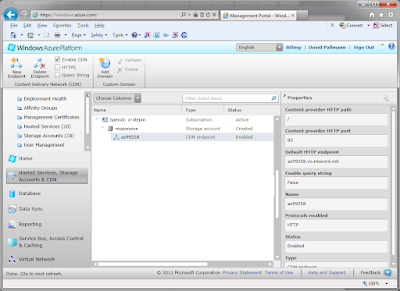
Our promotional images are residing in Blob Storage in the South Central US Data Center. We can enable efficient worldwide access through the Windows Azure Content Delivery Network. The CDN will use a worldwide network of 24 edge cache servers to serve images with high performance based on locale.

Testing the Global Site

Friendly DNS
One last thing we can do is give our web site a friendly DNS name. We’ll do this by purchasing the domain responsive-tours.com from GoDaddy. Now you can access the global site at http://responsive-tours.com. There are a number of ways we can forward the domain, we’ll deliberately choose here to do simple forwarding--so you can see the URL change when you visit the site to show the Windows Azure Traffic Manager is at work.
Here in Step 7 of 7 we’re going to deploy the solution to a Windows Azure data center. In this step we will:
• Create hosted services in multiple data centers
• Configure traffic management
• Update the Access Control Service to support the new data centers
• Enable Content Delivery Network for image blobs
• Deploy the solution to multiple Windows Azure data centers around the world
• Set up automated traffic management
• Set up a friendly DNS for the solution
Creating Hosted Services in Multiple Data Centers
In Step 6 we deployed the solution as a Windows Azure
Compute hosted service in a single Windows Azure data center (we chose the South
Central US location, which is in Texas). Now imagine we are serving a worldwide
audience, and that we’d like a global presence. We can achieve that by creating
additional hosted services in other parts of the world. • Configure traffic management
• Update the Access Control Service to support the new data centers
• Enable Content Delivery Network for image blobs
• Deploy the solution to multiple Windows Azure data centers around the world
• Set up automated traffic management
• Set up a friendly DNS for the solution
Creating Hosted Services in Multiple Data Centers
There are currently 6 Windows Azure data centers to choose
from: 2 in North America, 2 in Europe, and 2 in Asia. We’ll plan on running our
solution in two additional places: Western Europe (Amsterdam) and East Asia
(Hong Kong).
To streamline the work we need to do in this step, it’ll work
out best if we create the hosted
services now in the Windows Azure portal (noting their names and production
URLs) but do not deploy our solution
to them just yet. We need to note the production URLs for our hosted services. In
our example, they are responsive-us.cloudapp.net,
responsive-europe.cloudapp.net, and responsive-asia.cloudapp.net. Your names
will be different, as they must be unique.
A decision to make at this point is whether to create three
separate editions of your web site project. If you will be customizing content
based on location (for example, using different languages or content for each
locale) or creating a separate database for each data center (which would be necessary
in a real setting for performance), you may want to split out the web projects
separately or do the equivalent with clever build configuration. In our
sample code we have simply made three copies of the project (named /us, /europe,
and /asia), one for each data center.
Configuring Traffic
Management
A nice feature of Windows Azure is the Traffic Manager
service (currently in Community Technology Preview), which will allow us to
have a single .com address for our deployment even though it will exist in 3
data centers on 3 continents.
To set up the traffic manager, we use the Windows Azure
portal, choosing a unique name prefix for the Traffic Manager. In our example
that name is responsive, making the Traffic Manager endpoint http://responsive.ctp.trafficmgr.com.
This will ultimately be the endpoint we can use to access Responsive Tours
regardless of location. We then enroll each of our three hosted services (US,
Europe, Asia). Of course the hosted services aren’t deployed yet, but we’re doing
this now because we’ll need the Traffic Manager URL for configuring security.

We get to choose a policy in our Traffic Manager configuration
(performance, failover, or round-robin).
The best choice for this scenario would be Performance-based routing
based on location, but we’re going to use Round Robin in our example since it
is a demo, to prove that as you access the site at different times you
will in fact be routed to different data centers. In our HTML code, we’ve
changed the footer text of each site to indicate which location it is in so we
will have an easy way to detect that when we visit the site.
Updating Access
Control Service to Support the New Hosted Services
The Access Control Service we are using for authentication
needs to be configured to allow the additional data centers. You might think we
need to identify each hosted service as an additional Relying Party, but
actually all we have to do is identify the Traffic Manager endpoint as an RP.

One other change we need to make is in the Windows Identity
Foundation configuration in the Web.config file of our web project(s). In the
wsFederation element, we need to set the realm
to the Traffic Manager endpoint.
<federatedAuthentication>
  <wsFederation passiveRedirectEnabled="true" issuer="https://[MY-ACS-NAMESPACE].accesscontrol.windows.net/v2/wsfederation" realm="http://[MY-TRAFFIC-NAME].ctp.trafficmgr.com/" requireHttps="false" />
  <cookieHandler requireSsl="false" />
</federatedAuthentication>
Enabling Content Delivery Network for Image Blobs
Our promotional images are residing in Blob Storage in the South Central US Data Center. We can enable efficient worldwide access through the Windows Azure Content Delivery Network. The CDN will use a worldwide network of 24 edge cache servers to serve images with high performance based on locale.

<!-- begin - homepage promos --> <div class="home_promo_container"> <div class="home_promo"> <div class="home_promo_content" style="background-image:url(http://responsive.blob.core.windows.net/images/@(ViewBag.Promos["1"].ImageURL));"> <h2 data-bind="text: PromoTitle1"></h2> <p data-bind="text: PromoText1"/> <a class="button" href="#">Learn more »</a> </div> </div> <div class="home_promo"> <div class="home_promo_content" style="background-image:url(http://responsive.blob.core.windows.net/images/@(ViewBag.Promos["2"].ImageURL));"> <h2 data-bind="text: PromoTitle2"></h2> <p data-bind="text: PromoText2"/> <a class="button" href="#">Learn more »</a> </div> </div> <div class="home_promo"> <div class="home_promo_content" style="background-image:url(http://responsive.blob.core.windows.net/images/@(ViewBag.Promos["3"].ImageURL));"> <h2 data-bind="text: PromoTitle3"></h2> <p data-bind="text: PromoText3"/> <a class="button" href="#">Learn more »</a> </div> </div> <div class="clear_both"></div>Deploying the Solution Worldwide
Now it’s time to deploy our hosted services to the US,
European, and Asian data centers. As in Step 6, we can use Visual Studio to
package and publish the solutions. When we’re done, we should see 3 deployments ready in the Windows Azure portal.

Testing the Global Site
Now we’re ready to see our mobile and global solution work
in its global deployment. All we have to do is visit our Traffic Manager
endpoint with a desktop browser, tablet, or phone. In our example the endpoint
is http://responsive.ctp.trafficmgr.com.
The site comes up just as we expect it to, and as we do this from multiple
sessions and devices we can see that the location (shown in the page footer) varies
between South Central US, Western Europe, and East Asia. Note, you may get an occasional hiccup because we are not routing traffic based on location.

Friendly DNS
One last thing we can do is give our web site a friendly DNS name. We’ll do this by purchasing the domain responsive-tours.com from GoDaddy. Now you can access the global site at http://responsive-tours.com. There are a number of ways we can forward the domain, we’ll deliberately choose here to do simple forwarding--so you can see the URL change when you visit the site to show the Windows Azure Traffic Manager is at work.
Summary
In Step 7 we enabled the CDN for edge caching of blob
images, deployed the solution globally to 3 continents, and used the Windows
Azure Traffic Manager to manage traffic. Our site now has the following
functionality:
• Embodies responsive web design and runs on desktops,
tablets, and phones.
• Uses HTML5 and open standards on the web client
• Uses the Microsoft web platform on the web server.
• Provides server-side dynamic content (promotional items)
• Provides client-side dynamic content (Bing Maps)
• Is set up for Windows Azure Compute
• Can authenticate against web identities
• Is hosted in Windows Azure Compute
• Stores images in Windows Azure Blob Storage
• Stores promotional content in SQL Azure Database
• Uses Content Delivery Network for worldwide image caching
• Manages global traffic across 3 data centers on 3 continents
In this series we’ve seen the power that comes from combining HTML5, open standards, mobile devices, and responsive web design on the front end with the Microsoft web platform and Windows Azure cloud computing on the back end: true “mobile and global” web/cloud solutions that truly run anywhere and everywhere.
• Uses HTML5 and open standards on the web client
• Uses the Microsoft web platform on the web server.
• Provides server-side dynamic content (promotional items)
• Provides client-side dynamic content (Bing Maps)
• Is set up for Windows Azure Compute
• Can authenticate against web identities
• Is hosted in Windows Azure Compute
• Stores images in Windows Azure Blob Storage
• Stores promotional content in SQL Azure Database
• Uses Content Delivery Network for worldwide image caching
• Manages global traffic across 3 data centers on 3 continents
In this series we’ve seen the power that comes from combining HTML5, open standards, mobile devices, and responsive web design on the front end with the Microsoft web platform and Windows Azure cloud computing on the back end: true “mobile and global” web/cloud solutions that truly run anywhere and everywhere.
Subscribe to:
Posts (Atom)