Showing posts with label WP7. Show all posts

Friday, May 13, 2011

Windows Phone 7 Quickstarts for Windows Azure

Some new quickstart samples for Windows Phone 7 on Windows Azure are now available on codeplex at http://wp7azurequickstarts.codeplex.com/.

These quickstarts assume the use of the recently-released Windows Azure Toolkit for Windows Phone 7. The Windows Azure Toolkit for Windows Phone 7 is a great way to get started on phone + cloud development. One of its most valuable pieces is a demo app that you can get up and running on quickly as a starting point. A number of Windows Azure MVPs have collaborated to create an expanded set of samples derived from that demo app, which we’ve released today on codeplex.

There are currently 3 samples on the codeplex project site, with more to come. The apps are simple--no one will mistake them for polished commercial apps!--but if they coincide with a category of application you need to build they may give you a head start and help shorten your learning curve around combining Windows Phone 7 with Windows Azure.

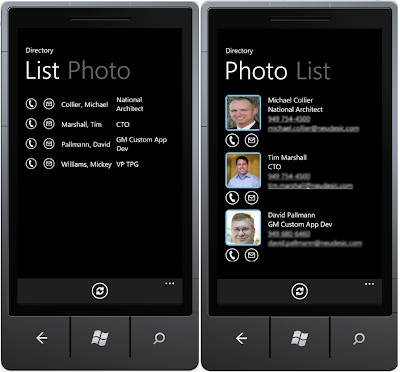
Corporate Directory Viewer

A corporate directory viewer, with a list view and a photo view. You can call or email a person by clicking on the appropriate action button.

Windows Azure Table Storage holds the information for each person (last name, first name, phone, email, location, etc.).

Windows Azure Blob Storage holds the images for each person.

Contributor: David Pallmann (dpallmann), Neudesic, Windows Azure MVP

Next Event App for a User Group

This application provides information for members of a User Group to see what is coming up in their Next Meeting. This app demonstrates some Windows Phone techniques for integrating with Windows Azure Blob storage, without having other server-side infrastructure, and without requiring that Azure storage keys be available on the Windows Phone device. The blob storage is loaded (and cached) by the Windows Phone app, demonstrating how to access blob metadata from the phone through HTTP headers, caching data in isolated storage, and updating. The metadata and blob content retrieved are displayed in several ways, including in a web browser control that loads from isolated storage (in case you are offline), and an address provided through metadata is geocoded and shown on a Bing map.

Contributor: Bill Wilder (codingoutloud), Windows Azure MVP


Locator

An app for locating nearby items of interest. The sample implementation is for public restrooms, but you can adapt to any kind of location-based resource.

Windows Azure Table Storage holds the information for each item (in this case a public restroom).

Windows Azure Blob Storage holds the images for each public restroom.

Contributor: Michael S. Collier (mcollier), Neudesic, Windows Azure MVP

Lots of Phone and Cloud Goodness at TechEd 11 Next Week

Next week is TechEd 11 in Atlanta, and Windows Phone 7 and Windows Azure will feature prominently. In addition to the many sessions on these and other subjects, there are some special events going on (including a phone-cloud hack-a-thon) and the opportunity to network with insightful and influential people such as Microsoft product team members and community members.

Speaking of community members, I and many of my fellow Windows Azure MVPs will be there, including Michael Collier (who works with me at Neudesic), Sergejus Barinovas, Shy Cohen, Cory Fowler, Scott Klein, Jason Milgram, Bill Wilder, and Jim Zimmerman. There will be many impressive people on the phone front as well, including another Neudesic colleague of mine, Simon Guest. There will be a number of events where you can meet us, including several “Meet the Experts” sessions. There will be a lounge area for hanging out and having informal discussions.

There are several “Birds of a Feather” (BoF) sessions related to Windows Azure that I’m participating in: Migrating to Windows Azure, How the IT Role is Changing, and How to Design Scalable Cloud Applications.

A really big event on Monday evening will be the 5-hour “Windows Phone 7 Unleashed Hackathon” which goes from 6pm to 11pm on Monday. This will be an event for phone development or phone+cloud development. Microsoft and community volunteers will be there to help get you started with tools and information and answer questions. If you want to get a head start, install the Windows Azure Toolkit for Windows Phone 7. It should be a lot of fun. You’ll find the registration details at the end of this post.

Lastly, I’ll be doing a book signing of my recent book, The Windows Azure Handbook, Volume 1: Planning and Strategy.

Well, as you can probably tell it is going to be a jam-packed week… hopefully I can find some time to take in some of the sessions! I look forward to meeting some of you who read this blog in person next week at TechEd!

* * * * * * * * * * * * * * *

Windows Phone 7 Unleashed Hackathon
Monday, May 16, 2011
6:00p.m. to 11:00 p.m.
Register: http://bit.ly/RegWP7Hackathon
Don't miss this opportunity to get hands on help with your Windows Phone 7 app, from the experts!

This is a "hands on" hackathon where you will learn from Windows Phone 7, XNA and Azure experts how to build, scale and publish your Windows Phone 7 app or game. If you are just a beginner, or already have apps in the Marketplace this event should not be missed.

BYO Laptop!

RSVP early, space is limited to 300 attendees:

Food and refreshments will be provided.

Omni Hotel At CNN Center
Grand Ballroom (A,B, C)
100 CNN Center
Atlanta, Georgia 30303

Sunday, October 31, 2010

First Impressions Moving from an iPhone to Windows Phone 7

Along with the other attendees of Microsoft’s Professional Developer Conference last week I received a Windows Phone, an LG E900 to be precise. It’s now been several days since I switched over from the iPhone I’d been using for the last couple of years to a Windows Phone and I thought I would share my first impressions. I’ll tell you up-front, I really like it.


iPhone Experience

First off, why was I on an iPhone to begin with? When I was ready for a new phone a few of years back there really wasn’t anything else in the iPhone’s class of user experience and innovation so it was a simple decision. Moreover, coverage where I live is poor for many of the main carriers but AT&T comes in strong which was another point in the iPhone’s favor.

I’ve enjoyed using my iPhone, but I kind of got disenchanted with Apple earlier this year when their version 4 Phone OS came out. The iTunes sync tool offered to upgrade my iPhone 3 to the version 4 OS so I accepted—and boy was I sorry! The phone became a near-useless piece of junk, with sporadic fits of slowness or outright unresponsiveness. It took a lot of research to find the right painstaking process to get back to the original OS. Apple was no help whatsoever, all but denying there was a problem. They also made some less than encouraging admissions, such as this one confessing the algorithm for showing how many bars of signal strength has been misleading. Moreover, owners of the iPhone 4 seemed to be having a lot of pain. I wasn’t sure I wanted to stay with Apple, which put me in the mood for looking around at other options. I knew Windows Phone was coming, and of course Android has been making quite a splash. I was waiting for something to push me in a particular direction.

The LG E900

That push came at PDC when attendees were given Windows Phones. The evening after receiving it I unwrapped the phone from its packaging box with anticipation—noting with some surprise the packaging claim that this phone was intended for use in Europe. I presume that’s just an artifact of this being a give-away. The “European” claim was reinforced by a Frankenstein’s monster of an adaptor, and that I wasn’t able to find an online user guide except on LG’s UK site. Things I can overlook in a free phone.


I immediately noticed the form factor difference—the LG E900 is longer and thinner than an iPhone and also noticeably heavier which gave me some concern at first; however I’ve since found the weight doesn’t bother me. I have to say, there wasn’t much in the way of instructions. The online user manual was of some help, once I tracked it down, but apparently you’re supposed to just figure out most things by exploring. For the most part this worked but it was a little frustrating not knowing how to do some basic things at first.

Making the Switch

I’m not a phone expert, and wondered to myself what I would have to do to get service on the phone. Then it dawned on me that perhaps I could just move the SIM card from my iPhone over to the Windows Phone. Would that work? I decided to find out.

An hour later, I still hadn’t gotten the SIM card out of my iPhone. That’s because it sits behind a door that isn’t easy to open unless you have a special tool or a paper clip. While this sounds simple, good luck doing it if you don’t have a paper clip handy: I tried a ballpoint pen, a plastic toothpick, a twist tie I scraped the insulation off of, and anything else I could find in my hotel room. After many tries but no success, I did what I should have done originally and went down to the hotel front desk and asked for a paper clip. 5 minutes later I had my SIM card out. It wasn’t obvious to me which way this oriented in the LG phone but I eventually figured it out through trial and error. A phone call and a text to my wife confirmed my phone service was working.

As I started to play with the phone I realized that my voice and text service was functional but not my data service. I could not browse the web or get email working. Fortunately I stumbled on this post which explains the set up steps to get your data working if you move from an iPhone to an LG E900 Windows Phone. After I’d followed these instructions to define an “APN”, data worked like a charm.

The User Interface

I hadn’t expected to like the UI of the Windows Phone all that much, for several reasons. First, it’s hard not to admire the iPhone’s user interface—the layout, size, and appearance of application icons as well as the design of many of the screens just feels right. Secondly, I’d seen the Windows Phone UI in conferences, online videos and television ads. I knew Microsoft had to strike out in a unique direction but it didn’t look all that appealing to me.

However, actually using one is a different story. The interface really works well. Three buttons on the bottom of the phone left you navigate back, go to the Start page, or search contextually within whatever app you’re in. There’s a cool feeling you get sliding and flipping around that you can’t appreciate when watching someone else do it. Those television ads that say we need “a phone to save us from our phones” are right on the money: you can get in and do your work really quickly on a Windows Phone. I like it.


I will say I wasn’t thrilled with the default red theme on my Start screen which I promptly changed to an appealing blue. Also, whatever theme color you do choose (there are ten to choose from, shown below), that color does dominate the user interface. Most of your Start screen tiles will be that color. The UI could benefit from a 2-color theme over a single color theme in my opinion. Speaking of the Start screen, those tiles are “live tiles” that contain data and some of them animate. This allows you at a glance to know if you have voice mail, text message, email, new apps in the marketplace, and so on.

Email

Setting up Outlook for my corporate mail could not have gone easier. Hotmail, on the other hand, was a different story. It wouldn’t sync, giving a mysterious error code and message that it was having trouble connecting to the Hotmail service after a few seconds. The fix turned out to be changing the mail account definition’s sync time from All Messages to Last 3 Days. This was discovered after a lot of trial and error: the error message certainly didn’t give a hint about that, nor is it clear to this day why All Messages doesn’t work (for me, anyway).

A few things took me some time to figure out. I couldn’t find a battery indicator at first; this turns out to be on the cover screen that you normally slide away right off the bat when you go to use the phone. Vibrate/ring also eluded me until I realized hitting the volume controls pops up an area for setting that.

Video and Audio

The video and audio quality are quite good. Streaming a movie from Netflix was excellent over a wifi connection—but rather blocky and dissatisfying without wifi. I watched Iron Man over the phone via Netflix and the picture was truly outstanding.

There's a 5 megapixel camera on the LG E900. It's terrific: it takes amazingly good photos and video.

Office

You get Office on the Windows Phone which is pretty cool. On my flight from Seattle back to Southern California I used Word on the phone to write a document and it was usable. It’s a little slow for me because I’m still getting used to this phone’s keyboard but that’s temporary.

App Store and Zune

The App Store experience is good and similar to the iPhone’s App Store. The number one phone app I use is email and that’s already there. Other apps I use that are already available for Windows Phone include NetFlix and Twitter. Another app I like to use on the iPhone is Kindle: fortunately at PDC it was announced Kindle is coming soon for Windows Phone and it was demonstrated in the keynote talk. Another favorite iPhone app of mine is Scrabble; we’ll have to see if that becomes available on Windows Phone. The app store experience is good but of course there aren’t as many apps yet for Windows Phone as for longer-established phones. We developers need to get busy creating great Windows Phone apps.

Just as iTunes is both the music/video store and sync tool for iPhone, Zune servers that purpose for Windows Phone. Once I installed Zune on my PC and connected the phone to it, I was able to download music (on a 14-day trial) and move music and pictures over to the phone.

Development

Another reason to get excited about Windows Phone is that you can program for it in Silverlight, which is a technology I use quite often. Moreover, Windows Phone and Windows Azure cloud computing go very well together. At PDC, Steve Marx gave a really great session on joint phone-and-cloud development which I highly recommend. There’s definitely some phone+cloud development in my future.

Conclusions

It’s not fair to compare a phone you’ve been using for a couple of days against one you’ve been using for a couple of years, but these are my first impressions. So far, I haven’t looked back!