Sunday, November 4, 2012

Microsoft, the Coolest Tech Company on the Planet

BUILD 2012 Delivers all of BUILD 2011's Promises, and More

A year ago, at BUILD 2011, Microsoft shared a bold vision for the future--and they needed to, because the world was changing fast. As I attended last year's conference, my mind abounded with questions--and Microsoft had answers for all of them. Good answers. Let's review what was shared then, and then we'll see where we actually are today.


The Vision and the Promises of BUILD 2011

• How would Microsoft survive what was being called by some the "Post-PC era"?
 With a cross-over operating system that would work on traditional PCs as well as touch tablets, and on ARM devices as well as x86 devices.

• What would Windows 8 look like? What languages would be used to program it?

Windows 8 has a compelling UI and design language, a big brother to what was originally called "Metro" on Windows 7. Along with that is a new Windows Runtime (WinRT), which can be programmed via HTML5/JavaScript, C#/XAML, or C++/XAML.


• How would Windows Phone make inroads in market share?

Microsoft wasn't saying a whole lot about Windows Phone 8 at the time. The hope of attendees of course is that the pantheon of large-to-small screens and devices for Windows 8 would also include the Windows 8 Phone family in some way at some point in time.

• When and how would Microsoft became a player in the ARM tablet world?

Windows 8 will work on both x86 and ARM devices. So along with upcoming hardware, you'll be able to have that iPad-like ARM tablet experience with long battery life on Windows 8.

• Would we be seeing original design or copied designs?

Original! What we now have to call Modern UI (the Metro name can no longer be used) is a cutting edge design and it's original. It also gives a fair degree of consistency of user experience between Windows 8 and Windows Phones.

• Where was Microsoft going with Windows Azure and their public cloud offerings?

Microsoft said they were working on all kinds of great things for Windows Azure, but we'd have to wait for some announcements.

• When would there be a credible Microsoft private cloud story?

Yes! What was code-named Windows Server 8 is built for public cloud. It allows many servers (even thousands) to be clustered, and they can be managed from a single console. Compute, network, and storage resources can be pooled, then carved out in virtual sections. Multi-tenancy is a core concept of the OS. System Center provides management.

• Was Microsoft really embracing HTML5, and how well would they support it?

Microsoft had already been demonstrating increasingly good support for the HTML5 client-side web stack, which also includes CSS, JavaScript, and common frameworks. Visual Studio 2012 and Blend would support them even more strongly, along with ASP.NET MVC4. Great work was also coming with TFS, and Microsoft was working on a cloud-based edition of TFS.

• Was there going to be any kind of strategy to unify all of this great stuff into a composed whole?

Yes! Microsoft calls this the era of "Connected Devices, Continuous Services" and it's a great way to think about how all the pieces fit together. You can see the mobile device and HTML5 web movements as part of a front-end revolution--which needs to be supported by a back-end revolution: a change in how we do IT, whether on-premises or in the cloud.

You had to be excited if you tuned into to BUILD 2011. Microsoft had the right answers and the right vision. Attendees even received an early preview copy of Windows 8 on a tablet PC so they could start learning how to develop Windows 8 apps.


A Year Has Passed... Did Microsoft Deliver?

You bet Microsoft delivered. If you attended or watched BUILD 2012 online you should have no doubt of that whatsoever. In case you missed it, I strongly recommend watching the following at http://buildwindows.com before reading further:

Day 1 Keynote by Steve Ballmer, Steve Guggenheimer, Kevin Gallo
Day 2 Keynote by Satya Nadella, Scott Guthrie, Scott Hanselman, Dave Campbell, Jason Zander, Josh Twist
Day 3 Web Talk by Scott Hanselman

Here's how the vision and promises of BUILD 2011 have become a reality. Microsoft not only delivered on their promises, they gave us even more.

Windows 8, The Cross-Over Operating System

Windows 8 has been available in some form for the last year in a variety of preview releases, but it was released for General Availability on October 26. So it's real, it's here, you can have it now.

Here's what my Windows 8 start screens look like on my x86 Dell laptop:

Windows 8 Pro Running on Dell Laptop

Because my laptop is an x86 device, I also get a classic desktop allowing me to run traditional apps:

 Windows 8 Pro Running on Dell Laptop - Classic Desktop


Innovative Hardware to Match the Innovative Operating System

We knew, as in the past, hardware manufacturers would work with Microsoft to create PCs and devices to work well with Windows 8. We learned a few months back that Microsoft themselves would be issuing their own tablets called Microsoft Surface, available in both ARM and x86 editions. This device is really cool: the cover not only does what you expect but is also a keyboard. It has a kickstand. Even Oprah Winfrey likes it, saying it "feels like a Mercedes-Benz to me, people".

Here's what my Windows 8 start screen looks like on my Microsoft Surface ARM tablet. Here, like on the iPad, I'm working solely with Touch. The edition of Windows 8 for ARM devices like this, Windows RT, doesn't include the classic desktop mode. However, it does come with a touch edition of Office 2013.

Windows RT Running on Microsoft Surface Tablet

 Modern UI

The "Design-Language-Formerly-Known-As-Metro" has a sleek design. This user experience is a hit. Even before Windows 8 was released, the look has been imitated everywhere, from web sites to presentation slides. Modern UI has well-defined precepts, clear principles, and is aided by controls in the Windows 8 runtime (WinRT) and project templates in Visual Studio.

There are a lot of fantastic features in the Modern UI, not least of which is the many controls that come with it. A favorite feature of mine is built-in spell checking across the OS and any apps that use text-oriented input.

New App Model

Modern UI isn't just about the start screen or a recommend user interface. There's a new app model, call Windows Store Apps. They have interesting concepts including the use of contacts to interact with other apps and the operating system for searching, sharing, and other functions. Apps don't have chrome, showing content and allowing users to intuitively interact with it is what you're supposed to do with your real estate. Touch, mouse, and keyboard work equally well. And you can summon app bars when you need toolbars of controls.

Here's what the built-in weather app looks like on my laptop running Windows 8. Note that it not only shows the weather, but the actual weather is depicted (e.g. day, night, raining, cloudy). It's very cool.


Weather App Showing Current Weather

Windows Runtime & Programming

If you're running on the classic desktop (e.g. on an x86 device), you can run all of your traditional apps that worked on Windows 7. But if you're working on the new kind of app, a Window Store App, what do you program in?

Wisely, Microsoft decided not to alienate the various developer circles out there and supports three different paths to creating native Windows 8 applications: C++/XAML, C#/XAML, or HTML5/CSS/JavaScript. The XAML-based approaches allows WPF or Silverlight developers to transfer their existing skills to Windows 8 development. The HTML5/JavaScript approach allows web developers to transfer their existing skills to Windows 8 development. Brilliant.

In a Windows Store App, you are in a sandboxed security environment. That means you must use the new WinRT APIs for many functions such as file storage or accessing the web. The API is available in each of the 3 language paths outlined above. For JavaScript developers, it's called WinJS.

Windows Phone 8

Although Microsoft wouldn't say much about Windows 8 plans or dates at BUILD 2011, they were sure enough working on it. Windows Phone 8 was released less than a week ago.

Attendees at BUILD 2012 received these wonderful Nokia Lumia 920 phones running Windows 8. These are nothing like the "frankenphones" given out at PDC 2010. These are extremely nice phones with large screens. They support qi charging, which means when I get the adaptor plate I just ordered I can just lay the phone on the pad to charge it without having to plug anything into the phone.

Here's what my start screen looks like on my Nokia Lumia 920 Windows 8 phone. I have to say, this phone is a thing of beauty. I was pretty happy on Windows 7.5 with my Samsung Focus (except for the short battery life), but I can only describe what I have now as that perfect marriage of well-designed hardware and well-designed software.


Start Screen on my Nokia Lumia 920 Windows 8 Phone

There's more good news. A lot of Windows 8 is now in Windows Phone 8. There's a new SDK out for Windows Phone 8. Best of all, you can reuse a lot of common code in apps that you want to have both Windows 8 and Windows Phone 8 editions of.

The closer affinity between Windows 8 and Windows Phone 8 is going to help market penetration of Windows Phone 8. For Windows 8, there's an extremely large market of Windows 8-ready PCs already out there. With the work Microsoft has done to make Windows 8 and Windows Phone 8 provide a very similar experience, and the ability to sync changes made on one of your devices to your other device(s), Windows 8 is going to help Windows Phone 8. Just as many apple fans own not one Apple device but many, you can now do that in the Microsoft world with great sync, sharing, and a common user experience from big screen to small.

Windows Azure / Public Cloud

Although Microsoft didn't say too much about Windows Azure at BUILD 2011, as an MVP I knew the product was working all Fall and Spring on a massive rollout of a broader, deeper, more mature cloud platform. In June 2012, all of this was made public and everyone had a chance to Meet Windows Azure all over again.

The updated Windows Azure platform now provides both Platform as a Service (PaaS) as well as Infrastructure as a Service (IaaS). And, it has a special mode just for 2-tier web sites with ultra-fast deployment called Windows Azure Web Sites (WAWS). You can read about the updates here. All of this means Windows Azure has something for everybody. PaaS users enjoy more automated management and can take full advantage of new services in the cloud. IaaS users can ensure portability of workloads between running in the public cloud or on-premesis. WAWS users get both benefits: management plus portability.


Windows Azure Now Has Three Modes of Use

But that's not all. Microsoft has been working hard on usability. The new HTML5-based portal (shown below) reflects this. Some of the newer services, like WAWS, are extremely simple to use. Even the lowest-level "manage it yourself" IaaS Virtual Machines feature was implemented lovingly.

New Windows Azure HTML5-based Portal

Another very important service Microsoft has added is called Windows Azure Mobile Services. This allows you to create a back-end in the cloud for your preferred mobile device at the click of a button. It currently supports Windows 8, iOS, and Windows Phone 8--with more mobile platforms on the way. This service makes storage, identity, push notifications, and more a snap. The mobile developer can now very easily set up a scalable back-end in the cloud without having to learn a lot about the cloud.


For a simple walk-through of Windows Azure Mobile Services, see my blog post. For a deeper and more functional demo, watch the BUILD 2012 Day 2 Keynote.


Windows Server / Private Cloud

A few months ago, Microsoft release Windows Server 2012, the official name for what had been described at first as Windows Server 8. The ability to cluster up to thousands of servers and pool their resources, managed from a single console, is amazing. It also has a beefed-up management UI. You can even move VMs around while they are running.


Along with System Center, Windows Server 2012 provides a credible private cloud story for Microsoft. And, Microsoft is aligning their public cloud and private cloud stories under the term CloudOS.

Visual Studio 2012, .NET 4.5, ASP.NET, MVC4

Visual Studio 2012 was also recently released. Web developers will find that VS2012 has superb support for HTML5, CSS, and JavaScript as well as detection and handling of various mobile devices. Web project templates have built-in support for responsive web design (adaptive layout).

Why This Makes Microsoft The Coolest Tech Company On The Planet

For Microsoft to really address the challenges facing it, it needed to demonstrate 4 things:

1. Design Savvy-ness. Microsoft needed to really show that it could be a cool design company and not just borrow inspiration from others. It did this both with the Windows 8 Modern UI as well as with the Surface device.

2. Coherency. Microsoft needed to ensure that for customers who stay within the Microsoft microcosm, it's devices, services, tools, and technologies work extremely well together. That is to say, if you own a PC, a tablet, and a phone all from Microsoft they should sync and work together to an amazing degree, and allow you to juggle them effortlessly.

3. Interop. Recognize there are other platforms out there and play nice with them. Microsoft is amply doing this with its mobile support in cloud services; in its HTML5 support in VS2012 and ASP.NET; in the use of open protocols like REST in cloud services APIs; and in its continued open sourcing of its core technologies.

4. The Fun Factor. Just play with a Surface tablet or a Windows 8 phone or interact with a Windows Store App, and you'll find yourself smiling. What you're doing is functional as well as fun, and that's the secret to being technologically cool.

...which is what Microsoft has become: the company making the coolest products.

Mission accomplished!

Wednesday, October 31, 2012

Microsoft Comes To Its Senses at BUILD 2012


At last year's BUILD conference, I shared about how incredible the conference was. Microsoft had introduced Windows 8 and The-Design-Language-Formerly-Known-As-Metro, and the Vision and that were displayed was just amazing. Some people even remarked that it felt like they were at an Apple conference. The vision was great, but it was mostly just vision at that point--sure, we got some early prototype tablets and a pre-alpha edition of the operating system, but it was far from ready for prime time. What would happen by BUILD 2012? Well, that's finally here and we can answer that question: a lot!

This year, Microsoft showed a lot more than vision: they showed execution. In fact, I would say this is the year Microsoft "came to their senses". The way I mean that is, Microsoft is showing both sense and sensibility in all that they are doing. It's going to take a series of blog entries to really cover the many and amazing things we've already been exposed to at this conference. In this first post I'd like to talk about how Microsoft is showing not only vision but is fully engaging with all its senses.

I advise people to watch the BUILD Keynote videos for Day 1 and Day 2 (especially). You will be bowled over.

Vision
We saw plenty of vision last year, but even more this year. Last year, I was impressed--first of all by Windows 8 and the incredible amount of style and design thought that had gone into Metro. I was equally impressed by some of the offerings--like Windows Server 8. Most of all, I was impressed by how all of this was tied together by a common theme, that we are living in the era of "Connected Devices, Continuous Services". This year, we saw this general idea taken to a deeper level. Apps that work from large screen down to phones, that expect users to switch devices, and keep everything in sync. New and updated cloud and server services that provide the backbone to make the front-end revolution possible--and with an incredible improvement in usability and ease of use. As you watch the keynote demos, expect to periodically hit the pause button to digest yet another epiphany before continuing.

Listening
Microsoft has steadily gotten better at listening over the years, and that was very evident at BUILD. For example, oodles of new features in Windows Phone 8 were added that address 90% of developer requests. I've been a Windows Azure MVP for several years, and just about everything on my wish list for the cloud is now a reality. Nobody takes feedback more seriously than Microsoft.

Touch
Microsoft now supports Touch as well if not better than anyone else out there. From Windows Phone 8 to Windows 8 to Internet Explorer, you can provide first-class touch support in your apps while also supporting mouse, keyboard, and stylus just as well. I've been playing with the Windows RT Surface and Nokia Lumia 920 Windows 8 phones (generously given out last night to BUILD attendees), and all I can say is WOW. I'll have more specific things to say later on, right now I am simply bowled over by all the FUN and FUNCTIONALITY I am getting from these devices. I don't use them because I have to or because it's part of my job to work with them, I prefer them. I recently had my Windows Phone 7 die and had temporarily reverted to an older iPhone until my phone plan's upgrade time arrived. Nothing has made me happier than moving off that iPhone and onto a Windows 8 Phone today: type I can actually read, easy and fast navigation, larger screen--love at first sight. I can say equally good things about my Surface RT tablet--I also use an iPad, so expect a blow-by-blow comparison at some point in the future.

Smell
Knowing where things are headed is vital in our industry, and Microsoft has been showing it is looking forward and thinking correctly. Microsoft needs to both be a player in current trends as well as showing leadership in new directions, and it is doing both. Put simply, everything I've seen and touched at BUILD passes the sniff test. I challenge Microsoft detractors to actually get their hands on a Windows 8 phone or Surface tablet, you will change your tune.

Taste
As with last year's BUILD conference, Microsoft is not only building great hardware, software, and services from a functional perspective but is also exhibiting good taste: there's a style and class in what's being delivered that was previously only attributed to companies like Apple. No more. Microsoft's design and styling is first-class and tasteful. I prefer the interfaces on the new devices to the traditional leaders, and I've used both quite a bit.

Microsoft, I am glad you have "come to your senses" in not just being a player but a leader. I could not be more excited than I am right now about what we developers have been given. We can now create fantastic apps and services--and we will.

Sunday, October 14, 2012

Windows 8 and the Cloud: Better Together

In this post we're going to talk about how you can leverage cloud computing in your Windows 8 apps: why you should, how to do it, and some illustrative examples. We'll look at 4 ways to use the cloud in your Windows 8 apps:

1. SkyDrive
2. Cloud Media
3. A Back-end in the Cloud
4. Windows Azure Mobile Services


A Quick Primer on Windows 8 and Windows Azure
Windows 8, as everyone knows, is Microsoft latest operating system. It's a big deal in many respects: a cross-over between PCs and mobile devices, designed to run well on both standard PCs and new ARM devices. It includes a new kind of app and styling ("The Design Style Formerly Known as Metro"). Developers need to go through a process to get their apps into the Windows Store, or alternatively they can be side-loaded for enterprise users. Developers have the choice of using C++/XAML, C#/XAML, or HTML5/CSS/JavaScript to create native applications.

Windows 8: Microsoft's New Cross-over Operating System

Windows Azure is Microsoft's cloud computing platform, and it is powerful indeed. With low-cost, consumption-based pricing and elastic scale, the cloud puts the finest data centers in the world in reach of just about anybody. It provides a wealth of services spanning from Compute (hosting) to Storage to Identity to Worldwide Traffic Management.

Windows Azure: Microsoft's Cloud Computing Platform

Both Windows 8 and Windows Azure are interesting and compelling in their own right, but the real power comes from combining them. Let's see why.


Why Use Windows 8 and the Cloud Together?
Although a Windows 8 app can be stand-alone, there are all sorts of reasons to consider leveraging cloud computing in your app. Here are some of the more compelling ones:

• Data: The cloud is a safe (triply-redundant) place for your app data
• Continuity: A home base so your users can switch between devices
• Elastic Scale: support mobile/social communities of any size
• Functionality: cloud computing service provide a spectrum of useful capabilities
• Connectivity: for sharing/collaborating with others you need a hub or exchange
• Processing:  do background / deferred / parallel processing for your app in the cloud

First off, let's note that there are two big revolutions going on right now in the computing world: the front end revolution, which has to be do with HTML5, mobility, and social networking; and the back-end revolution, which has to do with services and cloud computing. The point of the front-end revolution is relevance: ensuring you reach and stay well-connected to your users and their changing digital lifestyles. The point of the back-end revolution is transforming the way we do IT and supporting that front-end revolution. So, the cloud provides a very necessary back-end to what's happening on the front lines. This is true not only for Windows 8 but for all mobile apps, whether native or web-based.

This new digital world has users moving between devices big and small all the time. Even a single user is likely to move around between different devices: their work computer, their home computer, their phone, their tablet, an airport web kiosk. People need continuity: the ability to get at their content and apps from anywhere, any time.; This behavior requires a backbone for consistency that is ever-present. The cloud and its services are that backbone. Microsoft has a very good description for this: We're living in the era of Connected Devices, Continuous Services.

And then there's the Personal Cloud pattern, a very good illustration of which can be found in the Kindle Reader iPad App. The Kindle app can be used on multiple devices. The app has two views, Cloud and Device. In the Cloud view, you see everything in your library that you've purchased. In the Device view, you see the title you've downloaded to this particular device. We can see this pattern implemented similarly in other popular apps and services such as iTunes.

Personal Cloud Pattern on Kindle iPad App 

There's also a power and capacity synergy between device and cloud worth notice. Mobile devices, even though they're getting more and more powerful, still have very limited computing power and storage capacity--compared to the cloud, which has near-infinite processing and storage capacity. Smart apps combine the two.


1. Using SkyDrive in Your Windows 8 App
Although I'm mostly going to be talking about Windows Azure in this post, I want to mention that Windows Live SkyDrive comes with Windows 8 and there is automatic integration.

As an example, there's a Windows 8 app I'm in the middle of working on called TaskBoard. When I invoke a File Open or File Save dialog, the user can navigate to a variety of file locations (such as Documents) and device where to open or save a project. Included in that navigation is the option to load or store in SkyDrive. I did not have to do anything special in my app to make this happen, it's an automatic feature.

SkyDrive is Built-in to Windows 8 File Open and Save Dialogues


2. Using Cloud Media in Your Windows 8 App
It's of course quite common these days to leverage media--images, audio, or video--in our modern apps. You could of course just include your media directly in your app, but that makes it difficult to extend or change the content, requiring you to update your app and push it out through the Windows Store. It's much more flexible to have your app get its media from the cloud, where you can update or extend the media collection any time you wish.

The Windows Azure Storage service includes file-like storage called Blob storage. Like a file, a blob can hold any kind of content--and that includes media files. Blobs live in Containers, similar to how files reside in file folders. In the cloud, you can make your containers public or private. If private, you can only access them using a REST API and providing credentials. If public, the blobs have Internet URLs and for reading purposes you can use them anywhere--such as in the IMG tags of your HTML.

Let's demonstrate this, first by looking at one of the Windows 8 samples Microsoft provides which is called FlipView. We'll use the WinJS (HTML5/JavaScript) edition. FlipView shows us how to use the Windows 8 FlipView control, as you can see from the screen capture below. If we move through the FlipView by using its right or left navigation arrows, we see there is a collection of outdoor images.

FlipView Windows 8 Sample

If we look in the code, we see that the FlipView images are part of the solution itself and the list of images and description is nothing more than a JavaScript array. The HTML markup references a FlipView control and uses data binding attributes to define an image-and-title template to make it all happen.

FlipView Sample Markup and JavaScript Code

None of this is complicated to understand, but again all of this is hard-coded to the app internally. We'd like to make this dynamic and easily modifiable using the cloud. So let's get to it. In my case, I've made a copy of the app and I'm changing it around a bit to be about hot sauces. (October is Chili Cook-off seasons for me, and I spend much of the month subjecting my family to various recipes and hot sauces as we experiment).

The first step, then, is to get some images and put them in the cloud.

A Collection of Images We'll Use for our Host Sauce Gallery App

After locating some images, I provisioned a Windows Azure storage account and created a container named hotsauces. I then used a Storage Explorer Tool to upload those images to the cloud container.

Images Uploaded to Windows Azure Blob Storage

Because the container is marked public, each image that has been uploaded has an Internet URL. For example, http://neudesic.blob.core.windows.net/hotsauces/cholula.png will bring up one of the image in a browser.

Now that we have our images in the cloud, we also need our JavaScript array describing the images and their title (and one more addition, Scoville heat rating) to be dynamic and hosted in the cloud. All we need to do for that is create a text file in JSON format and also upload it to the cloud.

JavaScript Array for Cloud-based Hot Sauce Items

With our data list and images in the cloud, all that remains is to change the Windows 8 app itself to retrieve those items. Since we've added a Scoville heat rating to our data, we'll first amend our HTML markup to include that data item.

In the application start-up code, we'll need to modify how the array is set and bound to the HTML. Previously, the array was just directly populated in code. Now, we're going to load it from the cloud. We'll do that using the WinJS.xhr function, which performs an asynchronous communication request. Since our JSON data and images are Internet-accessible URLs, this is very straightforward. The code below shows how we do it. Notice that the communication is asynchronous, and the inner code to push array items in the array happens upon successful retrieval of the JSON data.

Revised Code to Download JSON array and Images from the Cloud

That's all there is to it. When we now run the app, it goes out and gets the hot sauce JSON array which in turn has the title, heat rating, and Internet URLs of each hot sauce. Our app now looks like this when we run it:

Our Host Sauce App, Now Using Dynamic Content from the Cloud
 
Moreover, we can easily change, add, or remove images and data just by modifying what's up in the cloud storage account. There's no need to update and app and push out a new version if we want to update our content.

A couple of other things to know about using Windows Azure storage. If you want, you can combine what we just did with the Windows Azure Content Delivery Network (CDN). This uses an edge cache network to efficiently cache and deliver media worldwide based on user location. The only impact using the CDN would have on what we just did above is that the URL prefix would change. You should also be aware that Windows Azure Storage provides not only blob (file-like) storage but also data table storage and queues, all of which can be accessed through WinJS.xhr and a REST API.

If you're working with video and want to intelligently stream it and handle multiple formats, you should investigate Windows Azure Media Services which is currently in preview.


3. Create Your Own Back-end In the Cloud
Although you can create them in HTML5 and JavaScript, a Windows 8 app is now a web app. A web app always has a server, for example, and also domain-restricts communication to that server. Your Windows 8 app doesn't have a domain restriction, nor does it come with or require a server. However, nothing prevents you from putting up a server with web services for your app and this is often a good idea. Why have a server back-end in the cloud? Here are some reasons to consider:

• For many of the same reasons a web app benefits from a web server
• Distribution of work - some done on the local device, some done back on the server
• To keep credentials off the local machine which is a security vulnerability
• To take advantage of the many useful cloud services that are available
• To connect to your enterprise to integrate with its internal systems and resources

What are some of the cloud service offered by Windows Azure? They include these:

• Compute (hosting) of web sites, web services, background services, middleware, products, and other kinds of a software.
• Relational Database Storage - Windows Azure SQL Database or MySQL
• Non-relational Storage: Blobs, Tables, and Queues
• Messaging an Integration: Service Bus Relay Messaging / Durable Brokered Messaging
• Caching: Cache Service
• Identity: Access Control Service
• Media: Media Services
• CDN: Content Delivery Network
• Traffic: Traffic Manager
• Networking: Virtual Network / hybrid cloud connections between cloud and enterprise
• Mobility: Mobility Services

So then, you just might want to put up some web services for your app to use, and putting them in the cloud makes a lot of sense: you get elastic scale, meaning you can handle any size load; it's cost-effective; and you can have affordable worldwide presence.

Let's consider how we would build our own back-end service on Windows Azure. We're going to build a really simple service that returns the time of day in various time zones. For this, we'll use the new ASP.NET Web API that is becoming a popular alternative to WCF for building web services for apps in the Microsoft world. We're going to host this in the cloud, and there are actually a few different ways to do that (see Windows Azure is a 3-lane Highway). In our case we are just going to build a really simple service so well use the Windows Azure Web Sites hosting feature which is fast and simple. For a more complicated example where you leverage many of the cloud services, you'd be best off using the Cloud Services form of hosting.

Creating our service is quite easy. We fire up VS2012 and create a new MVC4 Web API project. We then go into the pre-generated "values' controller and add some methods to return time of day.

Web API Service to Return Time

If we run this locally, we can invoke its functions with URLs like this: http://localhost:84036/api/values/-7 and we'll get a simple response like "4:30 PM" in JSON format. Doing this much is enough to test locally so w can now move on to creating the client. Once we're satisfied everything works we will of course deploy this service up to the cloud.

Now for the client side. We create a new empty Windows 8 app--using the HTML5/JavaScript approach--and now we need to provide some markup, CSS, and JavaScript code. For the markup, we're just going to show the various time zones and current time in a couple of HTML tables, and we'll also include a world time zone map.

Windows 8 World Time App - Markup 

There's also a bit of CSS for styling but I won't bother showing that here. Now, what needs to happen coding-wise? At application start-up, we want to go out and get the time for each of the time zones in our table and populate its cell with a value. We'll use a timer to repeat this once a minute in order to keep the time current. We use the WinJS.xhr method to asynchronously invoke the web service.

Windows 8 World Time App - JavaScript Code

We can now run the app and see it work:

Windows 8 World Time App - Running

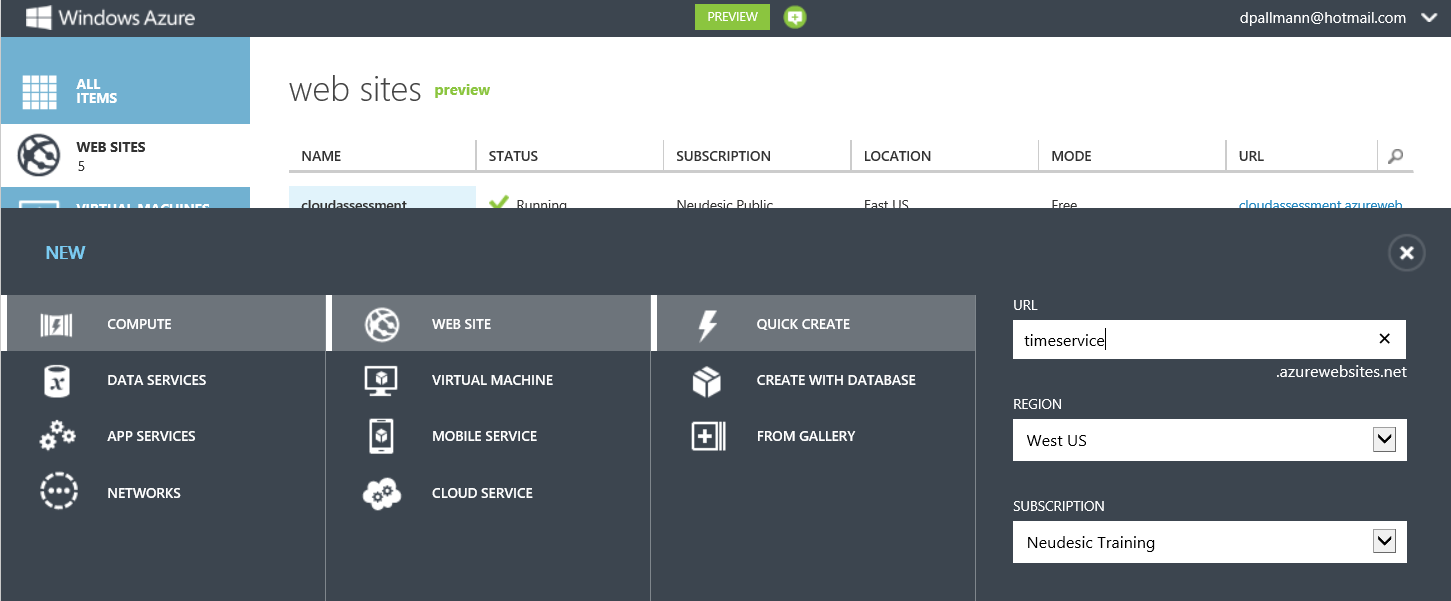
Very good - but remember, our service is still running locally. We need to put it up into the cloud. With Windows Azure Web Sites this is a fast and simple process that takes less than a minute.

Create a Windows Azure Web Site to Host Web Service in the Cloud

After creating the web site, we can download a publishing profile and deploy right from Visual Studio using Web Deploy. The last thing we need to do is change the URL the client code is using, which is now of the form http://timeservice.azurewebsites.net/api/values/timezone.


4. Using Windows Azure Mobile Services
We just showed you how you can create your own back-end in the cloud for your Windows 8 app, but maybe you don't really want to learn all those cloud details and would really like to stay focused on your app. Microsoft has a new service that will automatically create a back-end in the cloud for your Windows 8 app (and eventually, for other mobile platforms as well).

Because I've recently blogged on Windows Azure Mobile Services, I'll direct you that post rather than repeating it here. However, I do want to point out to you here and now how valuable this service is. It's really a mobility back-end in a box that you can set up and configure effortlessly. Among other things, it gives you support for the following:

• Relational Database (including auto-creation of new columns when you alter your app's data model)
• Identity
• Push Notifications
• Server-side scripting (in JavaScript)

Window Azure Mobile Services is definitely worth checking out. It has a great experience and is very easy to get started with.

This talk was recently given at a code camp, and you can find the presentation here.http://davidpallmann.blogspot.com/2012/10/presentation-windows-8-and-cloud.html

Presentation: Windows 8 and the Cloud

At SoCal Code Camp I recently gave a session on Windows 8 and the Cloud. My presentation is now available on SlideShare.


I've also blogged directly on the subject here.

Presentation: Don't Be a Lopsided Web Developer

Recently I blogged on the importance of not being a "lopsided" web developer. Meaning, our new HTML5 (etc.) web stack is not only new, it's massive. It's not one technology to learn, it's many. Along with technology there are techniques and architectural patterns to master. I recently gave a talk on the subject at So Cal Code in USC, and my presentation is now up on SlideShare for anyone who'd like to view it.


Wednesday, October 3, 2012

Neudesic Launches Cloud Assessment v2

Neudesic has relaunched its cloud assessment site, http://cloud-assessment.com.Neudesic was the first to have a comprehensive Windows Azure-specific cloud assessment offering, and we're now launching version 2 to reflect a more mature Microsoft cloud platform and a more sophisticated market.

The first thing you'll notice about the new cloud assessment site is that is it HTML5-based. It can be used on tablets as well as desktop browsers.


The site includes a cloud qualifier, which provides some quick feedback on likely cloud value based on answering some simple questions such as "We would like to reduce our IT costs" and "We want to have worldwide presence." Businesses use the cloud for different reasons, so it's important to tailor interest in cloud to specific benefits important to your organization.


Services we provide for cloud include briefings, cloud assessments, pilots, migration, new development, and training. The breadth and substance of those have changed over the last few years. Historically, that meant the following: briefings were usually for a technical audience; cloud assessments were most often a one-day affair where a single app was analyzed for cloud suitability; pilots, migrations, and new development needed to be estimated; and training meant 2-day developer training. All of this of course had the Windows Azure platform in view. Today, we are still all about Windows Azure but the platform is much  broader, including both IaaS and PaaS services. In cloud assessments, many customers these days are expressing interest in a generic cloud assessment that does not assume what the cloud vendor and platform will be. Lastly, many enterprises are interested in assessing not a single app but some or all of their IT portfolio. These are some of the drivers in overhauling our cloud service offerings, process, and online tooling.

Today, we offer two distinct lanes of cloud services. For a single department / single app focus, a briefing is a lunch-and-learn; an assessment is a one-day visit that includes an architectural design session and scoping of a migration. For a company looking at cloud at a high level where their entire IT portfolio is in view, a briefing includes both an executive briefing as well as a technical one; an enterprise assessment involves 2-4 weeks and can be generic or Windows Azure-specific as desired. In an enterprise assessment, we interview application stakeholders, categorize apps by platform and other criteria, and analyze cloud suitability for groups of applications. This includes an enterprise impact study which takes into account process impact, infrastructure impact, and cultural impact of introducing the cloud. For either level of engagement, a pilot or proof-of-concept is typically 2-4 weeks in length. Engagements for migration and new development need to be custom-estimated. We offer Windows Azure training for developers and/or IT professionals, which can span 2-5 days based on coverage. For companies needing bulk migration of dozens or hundreds of apps, we offer our Azure Migration Factory service which provides highly-efficient low-cost migration by leveraging parallel teams of offshore consultants supported by subject matter experts.

In the My Cloud area of the site, visitors can see a custom cloud plan based on their scope of interest (company-wide vs. single dept. / single app) and where they are in their cloud readiness (education, evaluation, pilot, adoption, looking to change cloud providers).


As in the past, an initial visit is free to qualified customers in the markets we serve.
The updated cloud assessment site is part of a larger initiative where Neudesic is updating its many online cloud properties. Stay tuned for more.

Monday, October 1, 2012

Windows Azure MVP Award Renewed

I'm honored to have again been selected by Microsoft as a Windows Azure MVP. I was part of the inaugural Windows Azure MVP group of October 2010 and am now heading into my third year. Working with the Microsoft product team and my fellow MVPs is extremely rewarding. Like last year, my focus will be on combining Windows Azure effectively with other key technology areas including HTML5, mobility, social networking, and Windows 8.

This is a good moment to reflect on where Windows Azure has been and where it's going. The platform is really in a mature place now, especially after the dazzling debut of new features that came in June of this year. Today, Windows Azure is the only cloud computing platform that provides both a comprehensive PaaS and IaaS offering. The future is bright.